

Elasticsearch-1
引例
现在假设我们有如下的一张数据库表

现在假设我们有一个需求是从这张表中搜索“手机”或者“华为手机”的相关信息,我们会怎么做?
select * from product where name like "%手机%";select * from product where name like "%华为手机%";但是针对这张表,我们如果直接通过以上SQL语句来查询,会存在两个问题:
- 针对单表的全表扫描效率低
- 关系数据库中提供的查询功能弱
思考一下,我们的一个电商网站中,有上百万商品数据,如果我们采用like的方式,去实现商品搜索的功能,其效率是非常低下的,同时由于用户输入的商品关键字是比较随意的,使用like的方式往往也很难真正查询到用户想要的商品。
ES介绍及基本概念
在很多场景下,比如电商网站的商品搜索,我们都需要使用全文检索的功能查询所需的内容,那么如何高效的实现全文检索的功能呢?解决之道就在于Elastic Search:
ElasticSearch是一个基于Lucene的分布式、高扩展、高实时的基于RESTful 风格API的搜索与数据分析引擎
RestFUL风格的API: 1. 发送JSON数据,返回JSON响应 2. 请求的类型就代表了对资源的操作类型 GET: 查询 POST: 修改 DELETE:删除 PUT:新增为什么Elastic Search能够实现大规模数据场景下的高效全文检索呢?主要是因为在ES中,数据的存储和组织方式与关系数据库不同。
我们首先需要了解ES中的基本概念:
-
字段(Field): 一个字段表示一个属性,类比于数据库表中的属性,数据库中的一行数据通常是多个属性值组成
-
文档(document):在ES中数据的存储和关系数据库不同,所有的数据都是以文档的JSON document的形式存在,document是ES中索引和搜索的最小的数据单位,类比于数据库中的一行数据,通常有多个字段值组成
-
映射(mapping): mapping定义了document中每个字段的类型、字段所使用的分词器等。相当于关系型数据库中的表结构。
-
索引(index): ElasticSearch存储数据的地方,可以理解成关系型数据库中的数据库概念,存放一类相同或者类似的document,比如一个员工索引,商品索引。
-
类型(Type):逻辑上的数据分类,一种type就像一张表。如用户表、角色表等。在Elasticsearch6.X默认type为_doc,es 7.x中删除了type的概念
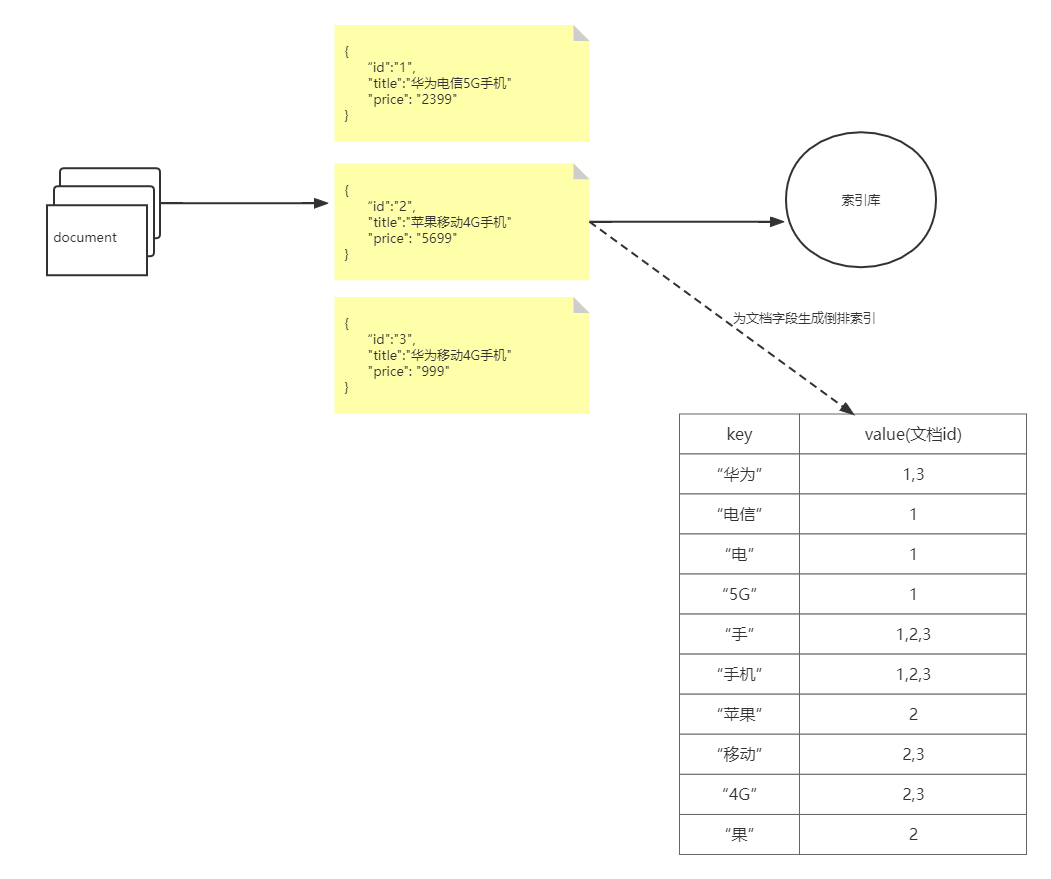
在了解了ES的基本概念之后,接下来,我们可以大致解释下,为何ES可以实现高效的全文检索功能,其中一个很重要的原因是ES使用了倒排索引(这里要注意的一点是,倒排索引和文档的存储本身没有关系,只是为了快速的全文检索,针对document的一个或者多个字段,所创建的索引)
那么什么是倒排索引呢?为了理解什么是倒排索引,我们先来理解正排索引。针对以下3条document文档数据所创建的正排索引如下:
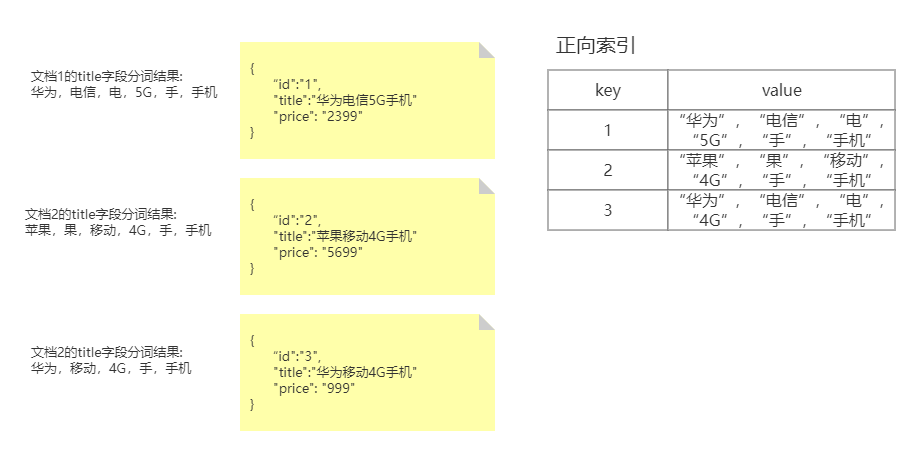
- 凡是索引其本质都是在建立一种映射关系
- 无论是正排索引还是倒排索引,在创建索引时都是要对目标字段的值进行分词的。
- 正排索引,建立的是文档的唯一标识Id(内容所在位置) ——> 文档目标字段内容的映射
如果我们是基于正向索引来查找和“华为手机”相关的商品信息(根据商品的title字段的值来匹配),首先对搜索的关键字也会做分词处理,比如分解为”华为”和”手机”两个关键词,然后遍历,每一个文档,和将关键词和文档中的分词内容进行匹配,此时,我们可以查找到我们所需要的华为手机的相关商品信息。
但是,使用正向索引我们仍然无法避免,遍历每一个商品对应的文档(“类似全表扫描”),这种匹配方式,效率比较低下。接下来,我们换种方式,基于倒排索引,来实现搜索。
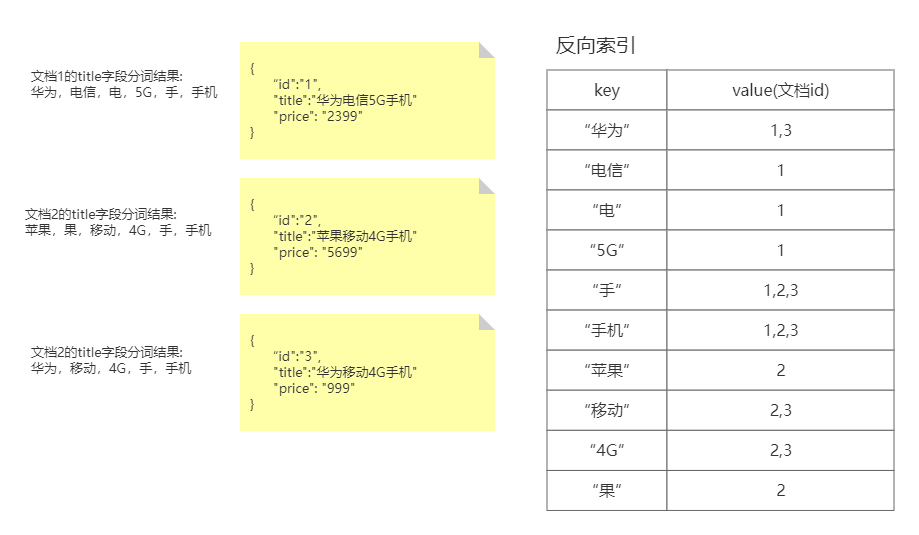
- 反向索引是以文段目标字段所有可能的分词结果为key,其value表达的是,包含改词的文档Id(即文档位置)
- 通过对比可知,反向索引表达的是文档字段内容 ——> 包含该内容的文档位置(文档Id)的映射
如果我们,基于倒排索引,来查找和关键字“华为手机”相关的商品,那么很显然,我们很容易就可以查询出想要的结果,并且还不需要,遍历每一个商品信息。同理,ES在搜索时就是基于倒排索引,所以它的搜索性能很好。
ES及可视化客户端安装
ElasticSearch安装
参考环境搭建文档
kibana安装
参考环境搭建文档
Restful API操作ES
ES虽然是基于Java语言开发的,但它的使用却不仅仅局限于Java语言,因为ES对外提供了Restful风格的API,我们可以通过这些Restful风格的API向ES发送请求,从而操作ES。
操作索引
- 创建索引
PUT http://ip:端口/索引名称- 查询索引
GET http://ip:端口/索引名称 # 查询单个索引信息GET http://ip:端口/索引名称1,索引名称2... # 查询多个索引信息GET http://ip:端口/_all # 查询所有索引信息- 删除索引
DELETE http://ip:端口/索引名称•关闭、打开索引
POST http://ip:端口/索引名称/_closePOST http://ip:端口/索引名称/_open
# 如果一个索引是关闭的状态,那么这个索引中的文档是不能被搜索的;但是如果一个索引是关闭的状态,索引本身的信息还是可以查询的数据类型
简单数据类型
我们先来看一个简单的映射定义:
PUT teacher/_mapping{ "properties": { "id": { "type": "integer" }, "name": { "type": "text" }, "isMale": { "type": "boolean" } }}在定义映射的时候,类比于定义数据库中的表结构,我们需要指明每一个字段的名称,数据类型等等信息,所以我们先得了解映射中包含的数据类型。
- 字符串
text:会分词,不支持聚合keyword:不会分词,将全部内容作为一个词条,支持聚合-
数值:long, integer, short, byte, double, float, half_float, scaled_float
-
布尔:boolean
-
二进制:binary
-
范围类型
integer_range, float_range, long_range, double_range, date_range- 日期
复杂数据类型
•数组:[ ] 没有专门的数组类型,ES会自动处理数组类型数据
•对象:{ } Object: object(for single JSON objects 单个JSON对象)
操作映射
- 添加映射
#添加映射 PUT student/_mapping { "properties":{ "name":{ "type":"text" }, "age":{ "type":"integer" } } }
#查询映射 GET studnt/_mapping- 创建索引并添加映射
#创建索引并添加映射 PUT teacher{ "mappings": { "properties": { "name": { "type": "text" }, "age": { "type": "integer" } } }}
# 查询映射GET teacher/_mapping- 添加字段
#添加字段PUT teacher/_mapping{ "properties": { "name": { "type": "text" }, "age": { "type": "integer" } }}
# 查询映射GET teacher/_mapping操作文档
•添加文档,指定id
POST teacher/_doc/2{ "name":"张三", "age":18, "address":"北京"}
GET /teacher/_doc/2•添加文档,不指定id
#添加文档,不指定id,自动生成POST teacher/_doc/{ "name":"张三", "age":18, "address":"北京"}
#查询所有文档GET /teacher/_search-
修改文档(全量覆盖)
POST teacher/_doc/2{"name":"张三","age":18,"address":"北京"} -
修改文档(只修改部分)
POST teacher/_update/2{"doc": {"name": "李四"}} -
删除文档
#删除指定id文档DELETE teacher/_doc/1分词器
对于Elastic Search而言,在生成倒排索引时,需要对文档字段分词,在搜索时,还需要对搜索关键字进行分词,分词的工作是由分词器来完成的,但是很遗憾,ES中默认使用的分词器,对中文支持的并不好,会对中文逐字拆分。所以对于中文内容的分词,我们通常会采用,对中文支持比较好的IK分词器。
IKAnalyzer是一个开源的,基于java语言开发的轻量级的中文分词工具包,基于Maven构建,具有60万字/秒的高速处理能力,并且支持用户词典扩展定义。
IK分词器的安装
参考环境搭建文档
IK分词器的使用
IK分词器有两种分词模式:ik_max_word和ik_smart模式。
1、ik_max_word
会将文本做最细粒度的拆分,比如会将“好好学习, 天天向上”拆分为“好好学习,好好学、好好、好学、学习、天天向上、天天,向上。
#方式一ik_max_wordGET _analyze{ "analyzer": "ik_max_word", "text": "好好学习, 天天向上"}ik_max_word分词器执行如下:
{ "tokens" : [ { "token" : "好好学习", "start_offset" : 0, "end_offset" : 4, "type" : "CN_WORD", "position" : 0 }, { "token" : "好好学", "start_offset" : 0, "end_offset" : 3, "type" : "CN_WORD", "position" : 1 }, { "token" : "好好", "start_offset" : 0, "end_offset" : 2, "type" : "CN_WORD", "position" : 2 }, { "token" : "好学", "start_offset" : 1, "end_offset" : 3, "type" : "CN_WORD", "position" : 3 }, { "token" : "学习", "start_offset" : 2, "end_offset" : 4, "type" : "CN_WORD", "position" : 4 }, { "token" : "天天向上", "start_offset" : 6, "end_offset" : 10, "type" : "CN_WORD", "position" : 5 }, { "token" : "天天", "start_offset" : 6, "end_offset" : 8, "type" : "CN_WORD", "position" : 6 }, { "token" : "向上", "start_offset" : 8, "end_offset" : 10, "type" : "CN_WORD", "position" : 7 } ]}2、ik_smart 会做最粗粒度的拆分,比如会将“好好学习, 天天向上”拆分为好好学习、天天向上。
#方式二ik_smartGET _analyze{ "analyzer": "ik_smart", "text": "好好学习, 天天向上"}ik_smart分词器执行如下:
{ "tokens" : [ { "token" : "好好学习", "start_offset" : 0, "end_offset" : 4, "type" : "CN_WORD", "position" : 0 }, { "token" : "天天向上", "start_offset" : 5, "end_offset" : 9, "type" : "CN_WORD", "position" : 1 } ]}指定分词器查询文档
文档的查询可以分为两种查询方式:
•词条查询(term):词条查询不会分析查询条件,只有当词条和查询字符串完全匹配时才匹配搜索
•全文查询(match):全文查询会分析查询条件,先将查询条件进行分词,然后查询,求并集
准备工作如下:
- 创建索引,添加映射,并指定分词器为ik分词器
PUT member{ "mappings": { "properties": { "name": { "type": "keyword" }, "address": { "type": "text", "analyzer": "ik_max_word" } } }}- 添加文档
POST member/_doc/1{ "name":"zs", "age":18, "address":"武汉市洪山区"}
POST member/_doc/2{ "name":"lisi", "age":18, "address":"武汉市"}
POST /member/_doc/3{ "name":"ww", "age":18, "address":"武汉黄陂"}- 查询映射
GET member/_search4.查看分词效果
GET _analyze{ "analyzer": "ik_max_word", "text": "武汉市洪山区"}下面分别采用两种方式查询,分词都是用IK分词器:
- 词条查询:term
查询member中匹配到”武汉”两字的词条
GET member/_search{ "query": { "term": { "address": { "value": "武汉" } } }}-
全文查询:match
全文查询会分析查询条件,先将查询条件进行分词,然后查询,求并集
GET member/_search{ "query": { "match": { "address":"武汉黄陂" } }}Java 操作ES
我们仍然基于SpringBoot工程,首先引入依赖
<parent> <groupId>org.springframework.boot</groupId> <artifactId>spring-boot-starter-parent</artifactId> <version>2.7.17</version> </parent>
<!-- springboot--> <dependency> <groupId>org.springframework.boot</groupId> <artifactId>spring-boot-starter</artifactId> </dependency>
<!-- springboot test--> <dependency> <groupId>org.springframework.boot</groupId> <artifactId>spring-boot-starter-test</artifactId> </dependency>
<!--引入es的坐标--> <dependency> <groupId>org.elasticsearch.client</groupId> <artifactId>elasticsearch-rest-high-level-client</artifactId> <version>7.8.0</version> </dependency> <dependency> <groupId>org.elasticsearch.client</groupId> <artifactId>elasticsearch-rest-client</artifactId> <version>7.8.0</version> </dependency> <dependency> <groupId>org.elasticsearch</groupId> <artifactId>elasticsearch</artifactId> <version>7.8.0</version> </dependency>定义ES配置类
@Configuration@ConfigurationProperties(prefix="elasticsearch")public class ElasticSearchConfig {
private String host;
private int port;
public String getHost() { return host; }
public void setHost(String host) { this.host = host; }
public int getPort() { return port; }
public void setPort(int port) { this.port = port; } @Bean public RestHighLevelClient client(){ return new RestHighLevelClient(RestClient.builder( new HttpHost(host,port,"http") )); }}准备好测试类
@SpringBootTest(classes = ESApplication.class)class ElasticsearchDay01ApplicationTests { @Autowired RestHighLevelClient client;
@Test public void test() { System.out.println(client); }}创建索引
1.添加索引
/** * 添加索引 * @throws IOException */ @Test public void addIndex() throws IOException { //1.使用client获取操作索引对象 IndicesClient indices = client.indices(); //2.具体操作获取返回值 //2.1 设置索引名称 CreateIndexRequest createIndexRequest=new CreateIndexRequest("member");
CreateIndexResponse createIndexResponse = indices.create(createIndexRequest, RequestOptions.DEFAULT); //3.根据返回值判断结果 System.out.println(createIndexResponse.isAcknowledged()); }2.添加索引,并添加映射
/** * 添加索引,并添加映射 */ @Test public void addIndexAndMapping() throws IOException { //1.使用client获取操作索引对象 IndicesClient indices = client.indices(); //2.具体操作获取返回值 //2.具体操作,获取返回值 CreateIndexRequest createIndexRequest = new CreateIndexRequest("member"); //2.1 设置mappings String mapping = "{\n" + " \"properties\" : {\n" + " \"address\" : {\n" + " \"type\" : \"text\",\n" + " \"analyzer\" : \"ik_max_word\"\n" + " },\n" + " \"age\" : {\n" + " \"type\" : \"long\"\n" + " },\n" + " \"name\" : {\n" + " \"type\" : \"keyword\"\n" + " }\n" + " }\n" + " }"; createIndexRequest.mapping(mapping,XContentType.JSON);
CreateIndexResponse createIndexResponse = indices.create(createIndexRequest, RequestOptions.DEFAULT); //3.根据返回值判断结果 System.out.println(createIndexResponse.isAcknowledged()); }查询、删除、判断索引
查询索引
/** * 查询索引 */ @Test public void queryIndex() throws IOException { IndicesClient indices = client.indices(); GetIndexRequest getRequest=new GetIndexRequest("member"); GetIndexResponse response = indices.get(getRequest, RequestOptions.DEFAULT); Map<String, MappingMetaData> mappings = response.getMappings(); for (String key : mappings.keySet()) { System.out.println(key+":"+mappings.get(key).getSourceAsMap()); } }删除索引
/** * 删除索引 */ @Test public void deleteIndex() throws IOException { IndicesClient indices = client.indices(); DeleteIndexRequest deleteRequest=new DeleteIndexRequest("member"); AcknowledgedResponse delete = indices.delete(deleteRequest, RequestOptions.DEFAULT); System.out.println(delete.isAcknowledged());
}索引是否存在
/** * 索引是否存在 */ @Test public void existIndex() throws IOException { IndicesClient indices = client.indices();
GetIndexRequest getIndexRequest=new GetIndexRequest("member"); boolean exists = indices.exists(getIndexRequest, RequestOptions.DEFAULT);
System.out.println(exists);
}添加文档
1.添加文档,使用map作为数据
@Test public void addDoc1() throws IOException { Map<String, Object> map=new HashMap<>(); map.put("name","zs"); map.put("age","18"); map.put("address","武汉市洪山区"); IndexRequest request=new IndexRequest("member").id("1").source(map); IndexResponse response = client.index(request, RequestOptions.DEFAULT); System.out.println(response.getId()); }2.添加文档,使用对象作为数据
@Testpublic void addDoc2() throws IOException { Person person=new Person(); person.setId("2"); person.setName("lisi"); person.setAge(18); person.setAddress("武汉"); String data = JSON.toJSONString(person); IndexRequest request=new IndexRequest("member").id(person.getId()).source(data,XContentType.JSON); IndexResponse response = client.index(request, RequestOptions.DEFAULT); System.out.println(response.getId());}修改、查询、删除文档
1.修改文档:添加文档时,如果id存在则修改(全量修改),或者做增量修改
/** * 修改文档:添加文档时,如果id存在则修改,id不存在则添加 */
@Test public void UpdateDoc() throws IOException { Person person=new Person(); person.setId("2"); person.setName("ww"); person.setAge(20); person.setAddress("长城");
String data = JSON.toJSONString(person);
IndexRequest request=new IndexRequest("member").id(person.getId()).source(data,XContentType.JSON); IndexResponse response = client.index(request, RequestOptions.DEFAULT); System.out.println(response.getId()); } /* 增量修改,只修改文档的一部分 */ @Test public void update() throws IOException { // 构造修改请求,修改member索引中,_id值为1的文档 UpdateRequest updateRequest = new UpdateRequest("member", "100023501");
// 准备修改的字段以及字段值 HashMap<String, Object> fieldMap = new HashMap<>(); // 假设只修改age字段的值 fieldMap.put("age", 100);
updateRequest.doc(fieldMap); UpdateResponse update = client.update(updateRequest, RequestOptions.DEFAULT); System.out.println(update.status()); }3.根据id查询文档
/** * 根据id查询文档 */ @Test public void getDoc() throws IOException {
//设置查询的索引、文档 GetRequest indexRequest=new GetRequest("member","1");
GetResponse response = client.get(indexRequest, RequestOptions.DEFAULT); System.out.println(response.getSourceAsString()); }4.根据id删除文档
/** * 根据id删除文档 */ @Test public void delDoc() throws IOException {
//设置要删除的索引、文档 DeleteRequest deleteRequest=new DeleteRequest("member","1");
DeleteResponse response = client.delete(deleteRequest, RequestOptions.DEFAULT); System.out.println(response.getId()); }文章分享
如果这篇文章对你有帮助,欢迎分享给更多人!