Java Web 开发:MyBatis
学习目标
理解MyBatis的设计思想
MyBatis和JDBC的关系
为何将SQL语句都集中管理在XML映射文件中
熟悉MyBatis的输入映射
- 未使用注解
- 使用注解
- ${}和#{}之间的区别
熟悉MyBatis的输出映射
- 为什么resultType写的是单个结果的类型
- resultType和resultMap的联系和区别
掌握动态SQL的使用
- 能够根据传入的值非空拼接SQL —> 条件插入、条件更新、条件查询
- foreach完成多条数据插入和in语句
- 获得自增的主键
掌握一对一、一对多场景的封装(至少掌握一种)
了解懒加载
了解缓存
前置知识准备
- 常用的SQL语句的编写(CRUD等)
- JDBC对应的SQL完成预编译、提供参数、并且完成结果集的封装
- 懒加载和立即加载
MyBatis介绍
SSM: Spring、Spring MVC、MyBaits
MyBatis本是apache基金会的一个开源项目ibatis ,2010年这个项目有apache迁移到了google code, 并且改名为Mybatis。2013年11月代码迁移到了github. Mybatis是一个基于Java的持久层框架。
Mybatis是一个ORM框架。(对象关系映射)
- 类和表之间的关系(比如User类和cskaoyan_user表)
- 类中的成员变量和表中的列(名称、JavaType和JdbcType)
- 数据库中一条记录和Java中的一个实例(比如一个user对象和cskaoyan_user表中的一条记录)
MyBatis 是一款优秀的持久层框架,它支持自定义 SQL、
存储过程以及高级映射。MyBatis 免除了几乎所有的 JDBC 代码以及设置参数和获取结果集的工作。MyBatis 可以通过简单的 XML 或注解来配置和映射原始类型、接口和 Java POJO(Plain Old Java Objects,普通老式 Java 对象)为数据库中的记录。// ORM:Object Relationship Mapping。 对象关系映射(说白了, 就是可以把Java中的对象映射成关系)。 其实Mybatis就是一个可以帮助我们把 关系型数据库中的记录转化为 Java对象,把Java对象转化为关系型数据库中的记录的这么一个框架。Mybatis就是一个可以帮助我们在Java代码中更加高效的去操作数据库的这么一个框架。
入门案例(Quick start)
JDBC
//定义了UserDao接口,我们传入id,可以查询user的记录出来public interface UserDao { User selectByPrimaryKey(Integer id) throws Exception;}// 假如我们定义了实现类,那么我们可以这样子来调用获得user记录public class JdbcExecution { // 查询id为2的用户 public static void main(String[] args) throws Exception{ UserDao userDao = new UserDaoImpl(); User user = userDao.selectByPrimaryKey(2); System.out.println("user = " + user); }}接着问题就是我们在实现类中的代码,使用JDBC的方式来完成,我们也把过程中的一些操作做一些分析,可以参考注释
public class UserDaoImpl implements UserDao{ @Override public User selectByPrimaryKey(Integer id) throws Exception { // 1.获得连接,如果后面需要提交事务,则执行connection.commit Connection connection = JdbcUtil.getConnection(); // 2.预编译,预编译过程中传入了SQL语句 PreparedStatement preparedStatement = connection.prepareStatement("select id, username, password, age, birthday, create_date, mobile from cskaoyan_user where id = ?"); // 3.提供占位符位置的值 preparedStatement.setInt(1,id); // 4.执行查询获得结果集 ResultSet resultSet = preparedStatement.executeQuery(); // 5.创建一个接收结果集中的值的实例 User user = new User(); while (resultSet.next()) { // 6.获得结果集中的username列(column)中的值 String username = resultSet.getString("username"); // 获得结果集中的password列(column)中的值 String password = resultSet.getString("password"); int age = resultSet.getInt("age"); Date birthday = resultSet.getDate("birthday"); Date createDate = resultSet.getDate("create_date"); String mobile = resultSet.getString("mobile"); user.setId(id); // 7.通过set方法封装给user实例中的username这个成员变量(property) user.setUsername(username); // 通过set方法封装给user实例中的password这个成员变量(property) user.setPassword(password); user.setAge(age); user.setBirthday(birthday); user.setCreateDate(createDate); user.setMobile(mobile); } return user; }}这个过程比较繁琐,并且存在着很多定制化的内容和耦合
- SQL语句和代码直接耦合在一起
- 设置参数过程比较繁琐,对应的关系只有占位符的序号,如果有多个占位符?的话,容易出错
- 查询结果集的使用比较繁琐
- 手动调用构造方法来获得实例
- 要关注列名从结果集中取出数据
- 要关注列的类型手动调用不同的方法,比如getInt、getString、getDate
- 取出的值需要使用set方法来封装
MyBatis
导包
<!--mybatis--><dependency><groupId>org.mybatis</groupId><artifactId>mybatis</artifactId><version>3.5.9</version></dependency><!-- 数据库驱动包 --><dependency><groupId>mysql</groupId><artifactId>mysql-connector-java</artifactId><version>8.0.20</version></dependency>
配置1: 配置一个Mybatis的主配置文件,用来获取SqlSessionFactory
// SqlSessionFactory:每一个Mybatis应用都是以SqlSessionFactory的实例对象为核心的。使用Mybatis必须以SqlSessionFactory的实例为核心,再以SqlSessionFactory的实例生产SqlSession实例对象的。// SqlSession:这个其实表示和数据库之间的一个连接,里面封装了 Connection对象<?xml version="1.0" encoding="UTF-8" ?><!DOCTYPE configurationPUBLIC "-//mybatis.org//DTD Config 3.0//EN""http://mybatis.org/dtd/mybatis-3-config.dtd"><configuration><properties resource="jdbc.properties"/><!--日志的配置--><settings><setting name="logImpl" value="STDOUT_LOGGING"/></settings><environments default="development"><environment id="development"><transactionManager type="JDBC"/><dataSource type="POOLED"><property name="driver" value="com.mysql.jdbc.Driver"/><property name="url"value="${url}"/><property name="username" value="${username}"/><property name="password" value="${password}"/></dataSource></environment></environments><mappers><mapper resource="com/cskaoyan/mapper/UserMapper.xml"/></mappers></configuration>
配置2: 配置一个专门用来存放SQL语句的配置文件,Mapper.xml
// 在Mybatis中,这样的文件可以有多个// 这些文件,都必须在Mybatis的主配置文件中,声明进来、<?xml version="1.0" encoding="UTF-8" ?><!DOCTYPE mapperPUBLIC "-//mybatis.org//DTD Mapper 3.0//EN""http://mybatis.org/dtd/mybatis-3-mapper.dtd"><!-- namespace: 命名空间,整个项目中必须唯一,暂时可以任意取名(后面再进行标准化) --><mapper namespace="usersql"><!-- 每个标签都需要一个唯一的id属性:每一个标签的id不能重复(本Mapper文件中), 用来标识一条SQL --><!-- 在这个Mapper文件中, 怎么唯一表示SQL语句?namespace.id (命名空间.标签的id ) 是这个SQL语句的坐标 --><!-- <insert> 插入标签 --><!-- <delete> 删除标签 --><!-- <update> 修改标签 --><!-- <select> 查询标签 --><!-- parameterType:参数的类型(可以省略,标准语法要指明 ) --><!-- resultType:返回的结果集的类型(不能省略) --><select id="selectByPrimaryKey" resultType="com.cskaoyan.model.User">select id, username, password, age, birthday, create_date as createDate, mobile from cskaoyan_user where id = #{id}</select></mapper>
使用
//使用的代码和前面完全一样public class MyBatisExecution {// 查询id为2的用户public static void main(String[] args) throws Exception{UserDao userDao = new UserDaoImpl();User user = userDao.selectByPrimaryKey(2);System.out.println("user = " + user);}}但是UserDaoImpl中的实现则完全不一样了
public class UserDaoImpl implements UserDao{@Overridepublic User selectByPrimaryKey(Integer id) {// 1.获得全局共享的SqlSessionFactory(线程安全)SqlSessionFactory sqlSessionFactory = MyBatisUtil.getSqlSessionFactory();// 2.开启SqlSession(线程不安全),其中封装了ConnectionSqlSession sqlSession = sqlSessionFactory.openSession();// 3.(1)传入Sql的坐标;(2)传入参数;(3)查询结果集的封装User user = sqlSession.selectOne("usersql.selectByPrimaryKey", id);return user;}}其中MyBatisUtil是提供全局共享的SqlSessionFactory实例的
public class MyBatisUtil {// 线程安全的值,可以全局共享private static SqlSessionFactory sqlSessionFactory;static {try {sqlSessionFactory = new SqlSessionFactoryBuilder().build(Resources.getResourceAsStream("mybatis.xml"));} catch (IOException e) {e.printStackTrace();}}public static SqlSessionFactory getSqlSessionFactory() {return sqlSessionFactory;}}
分析
在上面的案例中MyBatis默默的替我们做了什么事情
- connection.preparedStatement需要传入的Sql语句,我们仅仅提供了坐标(映射文件的命名空间+id)
- 参数和占位符的对应关系,自动对应起来
- resultSet获得结果集,并且封装为User实例的过程完全是MyBatis自动完成的
而上面的过程其实是实际开发过程中非常繁琐,而又很通用的事情
动态代理(Dynamic Proxy)
动态代理
一些问题
// 目前Mybatis使用起来还不够灵活,不够简单。// 虽然解决了SQL语句硬编码的问题,但是又出现了新的问题SQL语句的坐标存在硬编码sqlSession调用的方法需要我们自己去指定//也就是UserDaoImpl中的内容还不够通用,我们想要进一步干掉它而Mybatis的动态代理可以帮助我们去生成接口的代理对象。我们可以自己不实现接口。
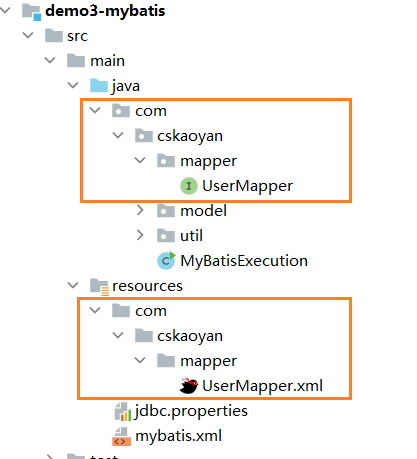
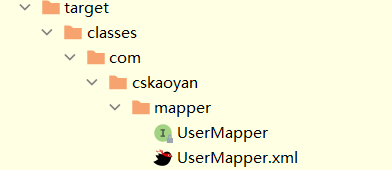
// 不需要实现接口,那么就需要遵守Mybatis使用动态代理的一些规则1, 接口的全限定名称 和 mapper.xml中的namespace的值保持一致2, 接口中的方法和 xml文件中的 <select> <insert> <update> <delete> 标签 一一对应,并且方法名要和标签的id值保持一致3, 方法的返回值类型和标签中的resultType保持一致(注意:添加/删除/修改不需要返回值类型)4, 参数保持一致(暂时可以不写)// 建议要遵守的规则:希望1, 文件的名字 UserMapper.xml | UserMapper.java 建议保持一致2, UserMapper.xml 和UserMapper.java 在编译之后的位置应该要在同一个路径下

编译后在同一路径

如何使用动态代理呢?
public class MyBatisExecution {// 查询id为2的用户public static void main(String[] args) throws Exception{//UserDao userDao = new UserDaoImpl();// 1.获取SqlSessionSqlSession sqlSession = MyBatisUtil.getSqlSessionFactory().openSession();// 2.根据SqlSession获得Mapper代理对象UserMapper userDao = sqlSession.getMapper(UserMapper.class);// 3.代理对象执行方法User user = userDao.selectByPrimaryKey(2);System.out.println("user = " + user);}}思考:代理对象做增强,他做了什么增强?
增删改查示例
添加
Account account = new Account();account.setId(10);account.setName("李白");account.setMoney(200);int rows = accountMapper.insertAccount(account);// sqlSession.commit();Connection connection = sqlSession.getConnection();connection.commit();// 添加public int insertAccount(Account account);<!--public int insertAccount(Account account);--><insert id="insertAccount" >insert into account set id=#{id}, name=#{name}, money=#{money}</insert>
删除
int rows = accountMapper.deleteAccountById(10);// sqlSession.commit();Connection connection = sqlSession.getConnection();connection.commit();// 删除public int deleteAccountById(Integer id);<delete id="deleteAccountById">delete from account where id=#{id}</delete>
修改
Account account = new Account();account.setId(10);account.setName("zs");account.setMoney(2000);int rows = accountMapper.updateAccountById(account);// sqlSession.commit();Connection connection = sqlSession.getConnection();connection.commit();// 修改public int updateAccountById(Account account);<update id="updateAccountById">update account set name=#{name}, money=#{money} where id =#{id}</update>
查找
Account account = accountMapper.selectAccountById(10);System.out.println(account);// 查找public Account selectAccountById(Integer id);<select id="selectAccountById" parameterType="java.lang.Integer" resultType="com.snow.www.bean.Account">select * from account where id = #{id}</select>
事务
在使用Mybatis的时候, 自带事务,而且事务默认情况下是不会自动提交的
// 解决办法一: 执行完SQL语句之后, 使用sqlSession提交事务sqlSession.commit();// 解决办法二: 执行完SQL语句之后, 使用sqlSession内部封装的Connection 提交事务Connection conn = sqlSession.getConnection();conn.commit();// 解决办法三:(自动提交) 在获得SqlSession的时候, 给sqlSessionFactory.openSession设置为真// 获取到的SqlSession,里面的connection不会自动提交SqlSession session = sqlSessionFactory.openSession();// 获取自动提交的SqlSessionSqlSession session = sqlSessionFactory.openSession(true);
搭建开发环境(MyBatis)
Maven项目
第一步: 导包在pom.xml
<dependencies><!--mybatis--><dependency><groupId>org.mybatis</groupId><artifactId>mybatis</artifactId><version>3.5.9</version></dependency><!-- 数据库驱动包 --><dependency><groupId>mysql</groupId><artifactId>mysql-connector-java</artifactId><version>5.1.47</version></dependency><!-- 测试包 --><dependency><groupId>junit</groupId><artifactId>junit</artifactId><version>4.12</version></dependency></dependencies>第二步: 配置MyBatis的主配置文件(
mybatis-config.xml)<?xml version="1.0" encoding="UTF-8" ?><!DOCTYPE configurationPUBLIC "-//mybatis.org//DTD Config 3.0//EN""https://mybatis.org/dtd/mybatis-3-config.dtd"><configuration><!-- 环境的配置,其实就是去配置数据库连接--><environments default="development"><environment id="development"><transactionManager type="JDBC"/><dataSource type="POOLED"><property name="driver" value="com.mysql.jdbc.Driver"/><property name="url" value="jdbc:mysql://localhost:3306/db47?useSSL=false&characterEncoding=utf8"/><property name="username" value="root"/><property name="password" value="123456"/></dataSource></environment></environments><!-- 去查找的Mapper文件 --><mappers><mapper resource="com/snow/www/mapper/AccountMapper.xml"/></mappers></configuration>第三步: 创建一个Java接口Mapper接口文件 (注意路径)
第四步: 创建一个与Java接口文件对应的Mapper.xml配置文件
// 在第三/四步骤中:1, 注意路径保持, 最终经过编译和对应接口文件编译到同一包下2, 文件的名字和接口的文件的名字保持一致3, xml中的namespace(命名空间)的值要和Java接口的全限定名称保持一致第五步: 把mapper.xml配置文件引入到主配置文件中(
mybatis-config.xml)<!-- 去查找的Mapper文件 --><mappers><mapper resource="com/snow/www/mapper/AccountMapper.xml"/></mappers>第六步: 加载主配置文件(
mybatis-config.xml)// 1. 读取配置文件InputStream inputStream = null;try {inputStream = Resources.getResourceAsStream("mybatis-config.xml");} catch (IOException e) {e.printStackTrace();}// 2. 获取SqlSessionFactorySqlSessionFactoryBuilder sqlSessionFactoryBuilder =new SqlSessionFactoryBuilder();sqlSessionFactory = sqlSessionFactoryBuilder.build(inputStream);第七步: 在对应的Mapper文件和对应的Java接口中, 声明SQL和声明方法
// 注意:1, 方法名和对应xml的SQL的id保持一致2, 参数和返回值设置正确3, 注意SQL返回值类型parameterType(结果集的解析是Mybatis自动完成的,不用我们自己解析)4, 注意SQL语句书写正确// 添加public int insertAccount(Account account);// 查找public Account selectAccountById(Integer id);<insert id="insertAccount" >insert into account set id=#{id}, name=#{name}, money=#{money}</insert><select id="selectAccountById" parameterType="java.lang.Integer" resultType="com.snow.www.bean.Account">select * from account where id = #{id}</select>第八步: 获取SqlSession 和 代理的Mapper对象
// 1. 获取SqlSessionsqlSession = sqlSessionFactory.openSession(true);// 2. 获取接口的代理对象studentMapper = sqlSession.getMapper(AccountMapper.class);第九步: 通过代理对象调用方法执行SQL语句
Account account = new Account();account.setId(10);account.setName("snow");account.setMoney(200);int rows = accountMapper.insertAccount(account);
配置(MyBatis)
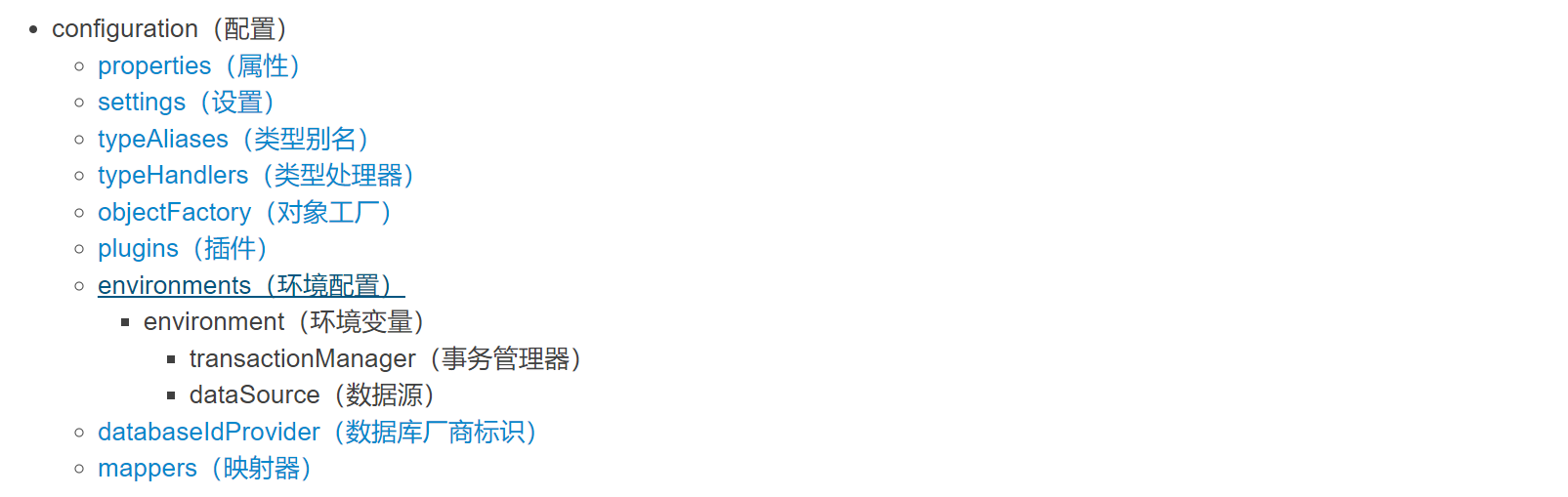
主要是介绍Mybatis的核心配置文件。
这些标签是有序的
properties
properties表示可以外部配置的属性,并可以进行动态替换。(作为典型的是JDBC配置)
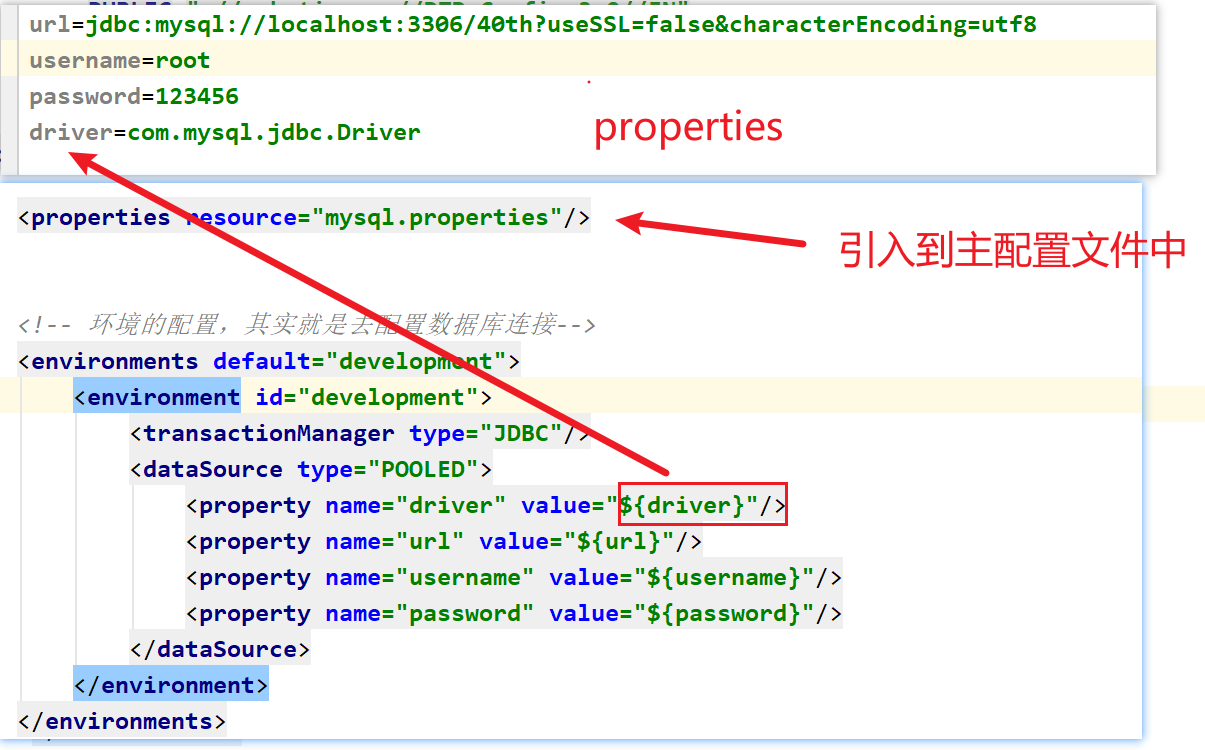
driver=com.mysql.jdbc.Driverurl=jdbc:mysql://localhost:3306/db47?useSSL=false&userUnicode=true&characterEncoding=utf8username=rootpassword=123456<configuration><!-- 引入外部配置文件 --><properties resource="jdbc.properties" ></properties></configuration>

settings
settings是MyBatis的行为配置(类似于idea和settings的关系)
eg: 日志配置
<configuration><settings><!-- 添加日志的配置 --><setting name="logImpl" value="STDOUT_LOGGING"/></settings></configuration>一个完整的settings配置 (暂时没用)
<settings><setting name="cacheEnabled" value="true"/><setting name="lazyLoadingEnabled" value="true"/><setting name="aggressiveLazyLoading" value="true"/><setting name="multipleResultSetsEnabled" value="true"/><setting name="useColumnLabel" value="true"/><setting name="useGeneratedKeys" value="false"/><setting name="autoMappingBehavior" value="PARTIAL"/><setting name="autoMappingUnknownColumnBehavior" value="WARNING"/><setting name="defaultExecutorType" value="SIMPLE"/><setting name="defaultStatementTimeout" value="25"/><setting name="defaultFetchSize" value="100"/><setting name="safeRowBoundsEnabled" value="false"/><setting name="safeResultHandlerEnabled" value="true"/><setting name="mapUnderscoreToCamelCase" value="false"/><setting name="localCacheScope" value="SESSION"/><setting name="jdbcTypeForNull" value="OTHER"/><setting name="lazyLoadTriggerMethods" value="equals,clone,hashCode,toString"/><setting name="defaultScriptingLanguage" value="org.apache.ibatis.scripting.xmltags.XMLLanguageDriver"/><setting name="defaultEnumTypeHandler" value="org.apache.ibatis.type.EnumTypeHandler"/><setting name="callSettersOnNulls" value="false"/><setting name="returnInstanceForEmptyRow" value="false"/><setting name="logPrefix" value="exampleLogPreFix_"/><setting name="logImpl" value="SLF4J | LOG4J | LOG4J2 | JDK_LOGGING | COMMONS_LOGGING | STDOUT_LOGGING | NO_LOGGING"/><setting name="proxyFactory" value="CGLIB | JAVASSIST"/><setting name="vfsImpl" value="org.mybatis.example.YourselfVfsImpl"/><setting name="useActualParamName" value="true"/><setting name="configurationFactory" value="org.mybatis.example.ConfigurationFactory"/></settings>
typeAliases
typeAlies类型别名。(也就是我们可以对 类 起别名,简化操作) (暂时不建议使用)
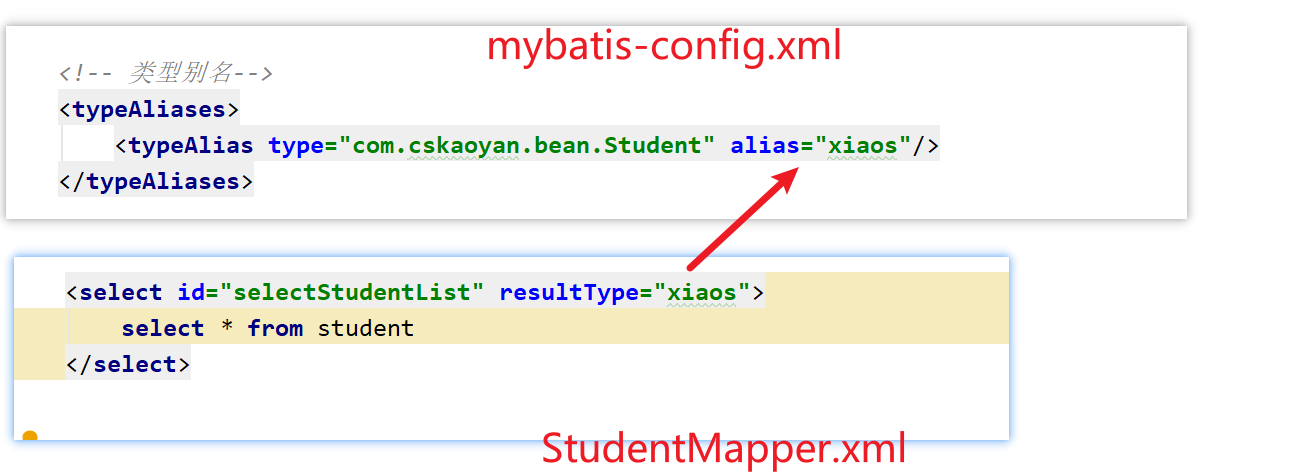
<configuration><!-- 类型别名 --><typeAliases><!-- alias别名 type全限定名 --><typeAlias alias="account" type="com.snow.www.bean.Account"/><typeAlias alias="user" type="com.snow.www.bean.User"/></typeAliases></configuration><select id="selectAccountById" resultType="account">select * from account where id = #{id}</select>

注意: Mybatis对于一些基本类型和包装类型,以及集合类型,有内置的别名。
// 值得注意的是下面是一些为常见的 Java 类型内建的类型别名。它们都是不区分大小写的,而且为了应对原始类型的命名重复,采取了特殊的命名风格。// 注意: 除了内置别名, 不要乱起别名<select id="selectNameById"parameterType="java.lang.Integer"resultType="java.lang.String">select name from account where id = #{id}</select><select id="selectNameById"parameterType="Integer"resultType="String">select name from account where id = #{id}</select><select id="selectNameById"parameterType="integer"resultType="string">select name from account where id = #{id}</select><select id="selectNameById"parameterType="_int"resultType="String">select name from account where id = #{id}</select>
别名 映射的类型 _byte byte _long long _short short _int int _integer int _double double _float float _boolean boolean string String byte Byte long Long short Short int Integer integer Integer double Double float Float boolean Boolean date Date decimal BigDecimal bigdecimal BigDecimal object Object map Map hashmap HashMap list List arraylist ArrayList collection Collection iterator Iterator
注意:
1, typeHandlers: MyBatis 对我们SQL参数或从结果集中取出一个值时, 都会用类型处理器将获取到的值以合适的方式转换成 Java 类型。(而在我们使用的时候是无法感知这个问题的, 属于MyBatis的底层处理).
2, ObjectFactory: MyBatis 使用一个对象工厂实例来完成实例化工作。 默认的对象工厂要么通过默认无参构造方法,要么通过有参数的构造方法实例化对象。如果想覆盖对象工厂的默认行为,可以通过创建自己的对象工厂来实现。(不要使用)
environments
environments: 可以配置成适应多种环境.比如开发环境、测试环境和生产环境等可能需要有不同的配置.
<!-- 环境的配置,其实就是去配置数据库连接--><environments default="development"><!-- 环境的id,是唯一的--><environment id="development"><!-- 事务管理器JDBC: 使用JDBC连接来管理事务MANAGED: 把事务的管理交给外部的容器 --><!-- 如果你正在使用 Spring + MyBatis,则没有必要配置事务管理器,因为 Spring 模块会使用自带的管理器来覆盖前面的配置。--><transactionManager type="JDBC"/><!--POOLED: 使用Mybatis自带的连接池UNPOOLED:不使用连接池JNDI:使用外部的连接池 --><dataSource type="POOLED"><property name="driver" value="${driver}"/><property name="url" value="${url}"/><property name="username" value="${username}"/><property name="password" value="${password}"/></dataSource></environment><environment id="test"><transactionManager type="JDBC"/><dataSource type="POOLED"><property name="driver" value="${driver}"/><property name="url" value="${url}"/><property name="username" value="${username}"/><property name="password" value="${password}"/></dataSource></environment><environment id="prod"><transactionManager type="JDBC"/><dataSource type="POOLED"><property name="driver" value="${driver}"/><property name="url" value="${url}"/><property name="username" value="${username}"/><property name="password" value="${password}"/></dataSource></environment></environments>
mappers
这个是映射器的配置。配置mapper.xml配置文件。
配置方式一: 直接以对应mapper文件的相对路径
<configuration><mappers><mapper resource="com/snow/www/mapper/AccountMapper.xml"/><mapper resource="com/snow/www/mapper/User.xml"/></mappers></configuration>配置方式二: 配置某个包下的所有的配置文件
<configuration><!--1. 接口和映射文件编译后要在同一级目录,并且同名2. 接口的全限定类名作为映射文件的命名空间3. 接口中的方法名(方法不允许重载)作为映射文件中的标签id(不允许重复)--><mappers><package name="com.snow.www.mapper"/></mappers></configuration>
输入映射
输入映射其实就是在说Mybatis是如何传值的。
映射文件中的SQL语句中的语法 —> #{}里写什么东西
#{}这个位置 最终在预编译的过程中变为了?
在Mapper接口中 方法的形参写了什么样式(个数、类型、注解),最终在映射文件中该方法对应的sql语句中的#{}应该如何写
// 只有一个参数// 传递多个参数// ....
一个参数
一个参数: (基本类型、包装类、String)
1, #{任意值} 来取值: 不建议使用(显得不标准), 建议使用注解写法
// 虽然一个参数的时候, 可以在{}内部任意书写参数名, 这种乱写行为不好, 不要这么写// 查找public Account selectAccountById(Integer id);<select id="selectAccountById" resultType="account">select * from account where id = #{xxx}</select>2, 如果在方法中 的一个参数 加了@Param注解,那么 后面就只能通过 #{注解值} 来取值
// 查找public Account selectAccountById2(@Param("id") Integer id);<select id="selectAccountById2" resultType="acc">select * from account where id = #{id}</select>
多个参数
多个参数: 需要注解指明#{注解值} 来取值
// 1, 直接写多个值, 用参数名简单匹配是不识别的// 2, 如果参数名简单匹配是不识别, 又不想加注解, 也是有别的解决手段(按位传值: 不建议), 但是建议加注解(最标准的写法)// 查找List<Account> selectListByIdOrName(@Param("id") Integer id,@Param("name") String name);<select id="selectListByIdOrName" resultType="acc">select * from account where id = #{id} or name = #{name}</select>
对象传值
对象传值
方式一: SQL使用的参数命名要和对象内部属性保持一致 (#{成员变量名} 来取值)
public interface UserMapper {//对象传值 → 没有使用@Param注解 → 成员变量名int insert1(User user);}<insert id="insert1">insert into cskaoyan_user (username, password, age, birthday, create_date, mobile) values(#{username},#{password},#{age},#{birthday},#{createDate},#{mobile})</insert>方式二: 对象有注解, 必须通过 #{注解值 . 成员变量名} 来取值
//对象传值 → 使用@Param注解 → @Param写了什么就用什么 → user.username、user.password等int insert2(@Param("user") User user);<insert id="insert2">insert into cskaoyan_user (username, password, age, birthday, create_date, mobile) values(#{user.username},#{user.password},#{user.age},#{user.birthday},#{user.createDate},#{user.mobile})</insert>
注意: 对象和多参数混合问题
使用Map传值
Map传值: 不建议使用
方式一: SQL使用的参数命名要和Map中存储数据的key保持一致 (#{key} 来取值)
//Map传值 → 没有使用@Param注解 → #{}里写的是map的key:id和usernameint updateUsernameById(Map map);<update id="updateUsernameById">update cskaoyan_user set username = #{username} where id = #{id}</update>方式二: Map对象有注解, 必须通过 #{注解值 . key} 来取值
//Map传值 → 使用@Param注解 → #{}里写的是@Param注解的值 + map的key:map.id和map.usernameint updateUsernameById2(@Param("map") Map map);<update id="updateUsernameById2">update cskaoyan_user set username = #{map.username} where id = #{map.id}</update>
按位置传值
按位传值: 完全不建议(容易因为程序员的记忆和修改导致bug产生, 除非除了按位传值没办法了)
方式一: arg0、arg1、arg2…
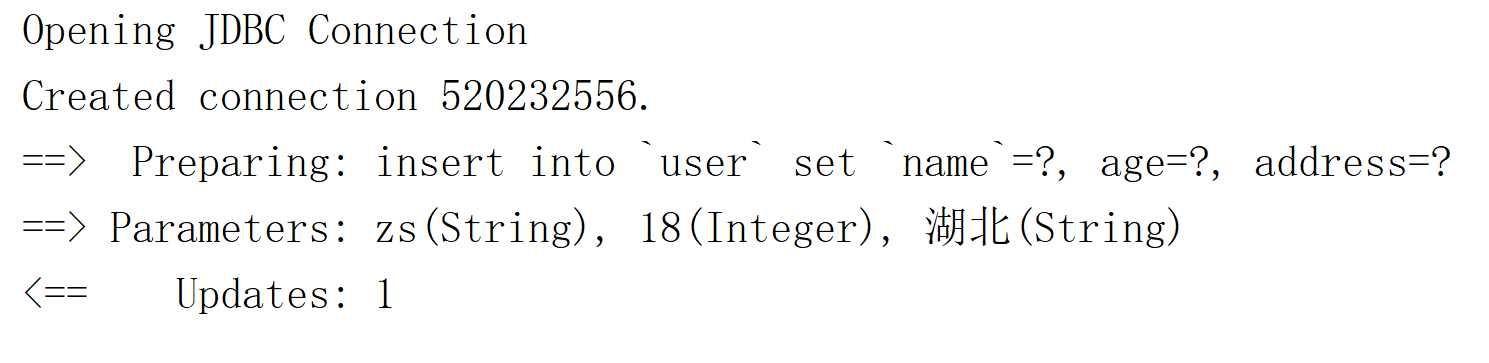
userMapper.insertUser("zs", 18, "湖北");<insert id="insertUser">insert into `user` set `name`=#{arg0}, age=#{arg1}, address=#{arg2}</insert>方式二: param1、param2、param3…
userMapper.insertUser("zs", 18, "湖北");<insert id="insertUser">insert into `user` set `name`=#{param1}, age=#{param2}, address=#{param3}</insert>
在Mybatis的输入映射中,我们经常使用前面三种方式(传入一个参数、传入多个参数、传递对象),后面通过map传值和按照位置来传值 一般不使用,也不建议大家使用。
#和$的区别
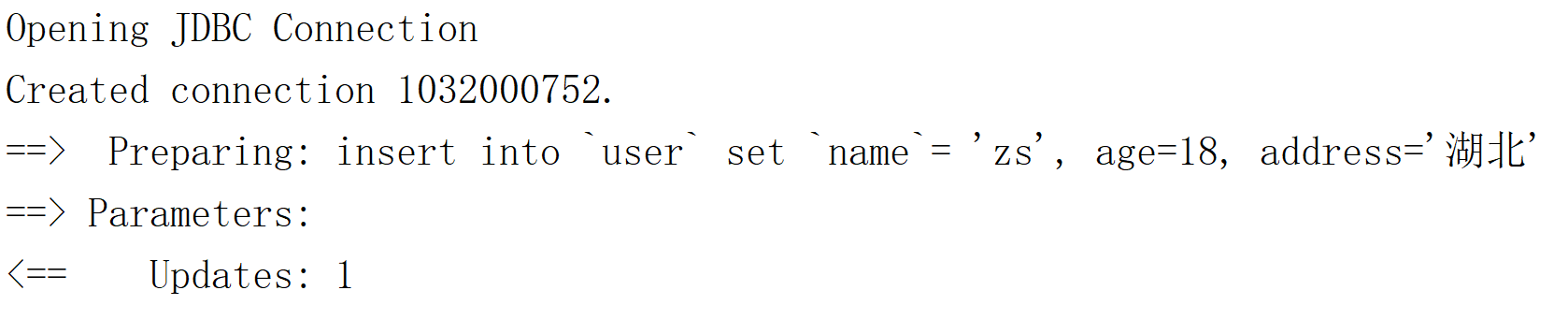
${}做的就是字符串的拼接,如果你传入的是字符串,需要你手动在${}外围手动增加单引号 ”
核心点: 使用${}有sql注入的风险
SQL注入:在你执行的SQL语句之外额外执行一部分,导致信息泄露或数据库被丢弃;
使用#{}过程是预编译,不会有SQL注入的风险,建议大家使用的方式
#{参数}使用: 预编译占位 (尽量使用 #{} ) PreparedStatement
userMapper.insertUserC("zs", 18, "湖北");<insert id="insertUserC">insert into `user` set `name`=#{param1}, age=#{param2}, address=#{param3}</insert>${参数}使用: 字符串拼接, Statement (存在SQL注入问题)
userMapper.insertUserP("zs", 18, "湖北");<insert id="insertUserP">insert into `user` set `name`= '${param1}', age=${param2}, address='${param3}'</insert>
SELECT id,product,money FROM `cskaoyan_product` where id = 3;
-- 如果我们使用#{}的方式-- Preparing:SELECT id,product,money FROM `cskaoyan_product` where id = ?-- Parameters:3
-- 如果我们使用${}的方式-- id提供的值是3-- Preparing:SELECT id,product,money FROM `cskaoyan_product` where id = '3';-- Parameters:
-- 如果有不法分子,提供的参数不是3,在3的基础上额外搞了一些东西-- 3' or '1' = '1SELECT id,product,money FROM `cskaoyan_product` where id = '3' or '1' = '1';注意
//1, 我们以后开发的时候,应该尽量使用 #{} 去接收传递过来的参数值//2, 当我们传递给SQL语句 表名或者是列名的时候,就必须得使用 ${} 来取值。分表问题: 动态表名
// userMapper.dynamicTableName("user2");userMapper.dynamicTableName("user");List<User> dynamicTableNameList(String user);<select id="dynamicTableNameList" resultType="com.snow.www.bean.User">select * from ${user}</select>分列问题: 动态列名
// List<User> list = userMapper.dynamicColumnName("id");List<User> list = userMapper.dynamicColumnName("age");List<User> dynamicColumnName(String age);<select id="dynamicColumnName" resultType="com.snow.www.bean.User">select * from user order by ${column}</select>
分表的思考.
思考
MyBatis在输入映射过程中有传入对象作为参数,那么这个过程是对JDBC做封装,思考一个问题就是JDBC过程会如何使用我们的对象的
比如这个接口和方法
public interface UserMapper { //对象传值 → 没有使用@Param注解 → 成员变量名 int insert1(User user);}对JDBC过程在分解一下
Connection connection = ConnectionUtil.getConnection();PreparedStatement preparedStatement = connection.preparedStatement("insert into cskaoyan_user (username, password, age, birthday, create_date, mobile) values (?,?,?,?,?,?)");// 传入的是user对象preparedStatement.setString(1,user.getUsername());preparedStatement.setString(2,user.getPassword());...输入映射,MyBatis如何使用的user,通过get方法来使用的
输出映射
一定和查询有关系 → 一定对应的是select标签
使用select标签一定会使用和类型有关系的属性:resultType、resultMap
resultType中可以写别名
resultType写的是单条记录的类型
-- 只有1列,并且记录数为1条 → 查询user表中有多少条记录-- 一个int或Integer类型的值来接收select count(*) from cskaoyan_user ;
-- 只有一列,结果的记录数为多条 → 查询年龄为xxx的用户的名称-- 数组或List、Setselect username from cskaoyan_user where age = 25;
-- 多列,结果的记录数为1条 → 查询id为某个值的用户的全部信息-- 引用类型对象select id,username,password,age,birthday,create_date,mobile from cskaoyan_user where id = 2;
-- 多列,结果的记录数为多条 → 查询年龄为xxx的用户的全部信息-- 引用类型对象的数组或List、Setselect id,username,password,age,birthday,create_date,mobile from cskaoyan_user where age = 25;选择何种封装类型:取决于结果集中的列的个数,以及结果的记录数
封装最终体现在哪里?落脚点在Mapper接口中的方法的返回值类型
输出映射是指Mybatis是如何把SQL语句执行结果映射为 Java对象的。
// 一个参数// 多个参数// 单个对象// 多个对象// resultMap: 比较重要(很常用)
一个参数
结果列为1且记录数为1(或0)
一个参数: 必须要有resultType(写简单参数的
全限定名称或者是内置的别名)// 单个列,结果记录数为1int selectCount();String selectNameById(@Param("id") Integer id);//List<String> list → list.get(0)<select id="selectCount" resultType="int">select count(*) from cskaoyan_user</select><select id="selectNameById" resultType="java.lang.String">select username from cskaoyan_user where id = #{id}</select>
多个参数
列只有一列,结果集中的记录数有多条(0或1条)
指: 多个参数构成的数组/List/Set
// 当我们返回多个简单参数的时候,在方法中定义的是数组就会返回数组,定义的是集合就会返回集合。xml中的标签配置不需要改变。并且, resultType的值是单个元素的类型。// 单个列,结果记录数为多条// 按照不同的类型来封装,但是SQL语句是一样的String[] selectNamesByAge1(@Param("age") Integer age);List<String> selectNamesByAge2(@Param("age") Integer age);Set<String> selectNamesByAge3(@Param("age") Integer age);<select id="selectNamesByAge1" resultType="java.lang.String">select username from cskaoyan_user where age = #{age}</select><select id="selectNamesByAge2" resultType="java.lang.String">select username from cskaoyan_user where age = #{age}</select><select id="selectNamesByAge3" resultType="java.lang.String">select username from cskaoyan_user where age = #{age}</select>
单个对象
核心点:查询结果集中的列名 要和 对象中的成员变量名(set方法)相同
查询结果集中的列名可以通过as起别名的方式做修改
单个对象:
// 1. Mybatis在去映射的时候,会把`成员变量名` 和`查询结果的列名`去一一映射,假如原始表中的列名和成员变量名不一致的话,我们可以通过取别名的方式来解决(也可以通过resultMap来解决)// 2. 在声明JavaBean的成员变量的时候,尽量的使用包装类型// 多个列,结果记录数为1User selectByPrimaryKey(@Param("id") Integer id);<select id="selectByPrimaryKey" resultType="com.cskaoyan.demo2.bean.User">select id, username, password, age, birthday, create_date as createDate, mobile from cskaoyan_userwhere id = #{id}</select>````
多个对象
如果是采用JDBC会如何写
ResultSet resultSet = prepareStatement.executeQuery();List<User> users = new ArrayList<>();while(resultSet.next()){ User user = new User(); user.setUsername(resultSet.getString("username")); user.setPassword(resultSet.getString("password")); user.setAge(resultSet.getInt("age")); user.setBirthday(resultSet.getDate("birthday")); user.setCreateDate(resultSet.getDate("createDate")); user.setMobile(resultSet.getString("mobile")); users.add(user);}//如果你需要一个Set可以在第2行这里定义为一个set ,也可以将这个List转为一个Set//如果你需要一个数组,也可以将这个List转为一个数组多个对象: 数组/List/Set
//1, resultType的值是单个元素的类型。// 多个列,结果记录数为多条User[] selectByAge1(@Param("age") Integer age);List<User> selectByAge2(@Param("age") Integer age);Set<User> selectByAge3(@Param("age") Integer age);<select id="selectByAge1" resultType="com.cskaoyan.demo2.bean.User">select id, username, password, age, birthday, create_date as createDate, mobile from cskaoyan_userwhere age = #{age}</select><select id="selectByAge2" resultType="com.cskaoyan.demo2.bean.User">select id, username, password, age, birthday, create_date as createDate, mobile from cskaoyan_userwhere age = #{age}</select><select id="selectByAge3" resultType="com.cskaoyan.demo2.bean.User">select id, username, password, age, birthday, create_date as createDate, mobile from cskaoyan_userwhere age = #{age}</select>
resultMap
核心点:查询结果集中的列名 要和 对象中的成员变量名(set方法)对应
存在这样的对应关系,我们才知道从结果集拿那一列的值(resultSet.getString(“列名”)),获得的值要封装给哪一个成员变量
resultMap: 是用来做参数映射的
@Datapublic class UserVo {private Integer userId;private String userName;private Integer userAge;private String userMobile;}UserVo selectUserVoByPrimaryKey(@Param("id") Integer id);<!--id属性:要和select标签中的resultMap属性建立联系--><!--type属性:写的是要封装的对象的全限定类名(或别名)--><resultMap id="userVoMap" type="com.cskaoyan.demo2.bean.UserVo"><!--查询结果集中的列名要和成员变量名建立映射关系--><id column="id" property="userId"/><result column="age" property="userAge"/><result column="username" property="userName"/><result column="mobile" property="userMobile"/></resultMap><!--resultMap属性中写的是引用的resultMap标签的id--><select id="selectUserVoByPrimaryKey" resultMap="userVoMap">select id,username,age,mobile from cskaoyan_user where id = #{id}</select>
resultMap是可以复用的
插件
Lombok
Lombok: 可以帮助代码在编译的时候生成对应的方法。
// getter// setter// toString// hashCode// equals
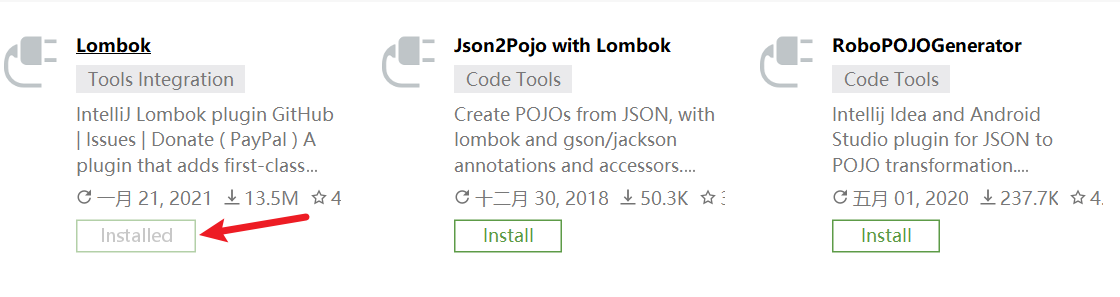
第一步: 安装插件
第二步: 导包
<dependency><groupId>org.projectlombok</groupId><artifactId>lombok</artifactId><version>1.18.12</version></dependency>第三步: 使用
//@Getter@Setter@ToString@EqualsAndHashCode//@NoArgsConstructor//@AllArgsConstructor@Datapublic class UserVo {private Integer userId;private String userName;private Integer userAge;private String address;}
Lombok: 好处
// 1. 优势在去修改(增删改)成员变量的时候,不用我们自己再去生成getter、setter等,效率比较高// 2. 缺点Lombok在项目中,只要有一个人用了,那么其他的组员也都要使用
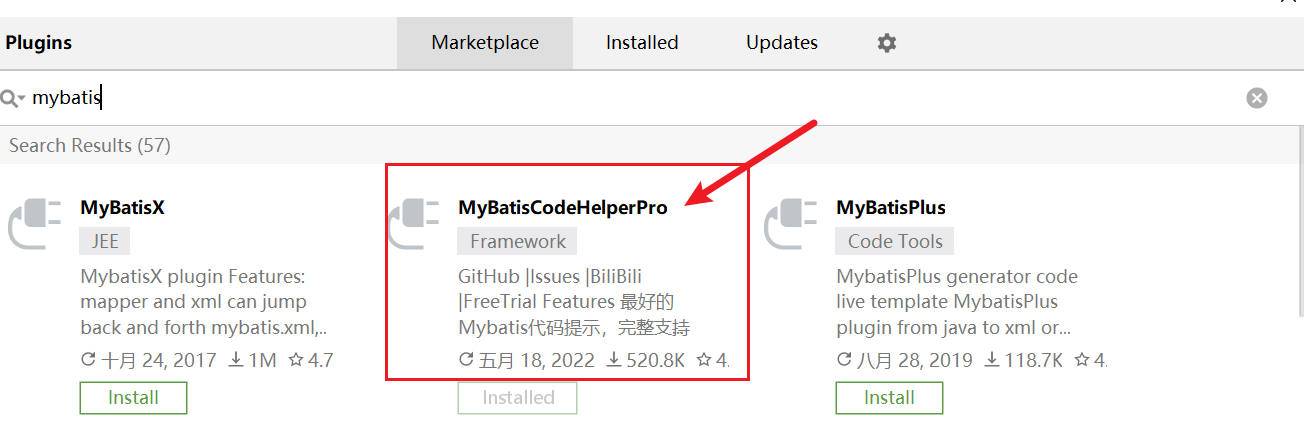
MybatisCodeHelperPro
MybatisCodeHelperPro: 这个是Mybatis的一个插件(提高开发Mybatis应用程序的效率)。
// 帮助我们在mapper和mapper.xml 之前来回跳转// 可以帮助我们生成mapper.xml文件中的标签// 可以做一定的代码提示// ...
步骤一: 插件安装
多表查询
一对一结构
结构示例
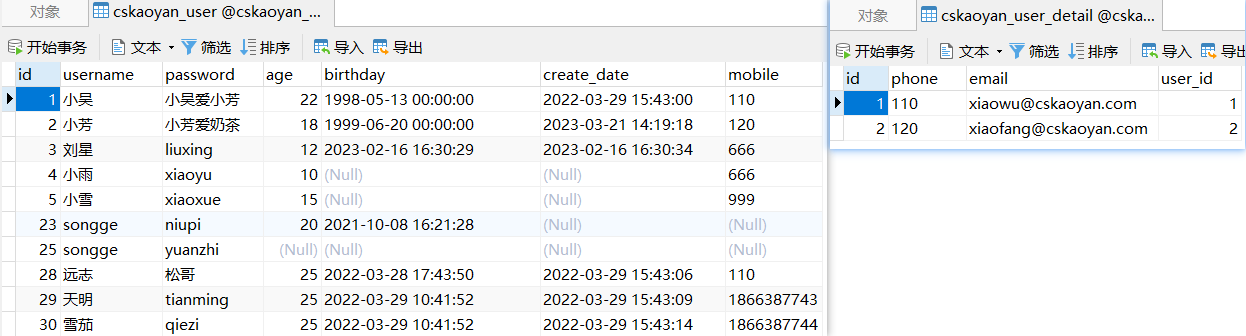
CREATE TABLE `cskaoyan_user` (`id` int(11) NOT NULL AUTO_INCREMENT,`username` varchar(255) DEFAULT NULL,`password` varchar(255) DEFAULT NULL,`age` int(11) DEFAULT NULL,`birthday` datetime DEFAULT NULL,`create_date` datetime DEFAULT NULL,`mobile` varchar(255) DEFAULT NULL,PRIMARY KEY (`id`)) ENGINE=InnoDB AUTO_INCREMENT=69 DEFAULT CHARSET=utf8mb4;CREATE TABLE `cskaoyan_user_detail` (`id` int(11) NOT NULL AUTO_INCREMENT,`phone` varchar(255) DEFAULT NULL,`email` varchar(255) DEFAULT NULL,`user_id` int(11) DEFAULT NULL,PRIMARY KEY (`id`)) ENGINE=InnoDB AUTO_INCREMENT=3 DEFAULT CHARSET=utf8mb4;@Data@AllArgsConstructor@NoArgsConstructorpublic class User {private Integer id;private String username;private String password;private Integer age;private Date birthday;private Date createDate;private String mobile;private UserDetail userDetail;}@Datapublic class UserDetail {Integer id;String phone;String email;String userId;}
方式一: 分次查询
UserMapper接口
//查询到user的信息,并且也能查询到userDetail的信息User selectUserByUsername(@Param("username") String username);User[] selectUsersInIdArray(@Param("ids") Integer[] ids);UserMapper.xml文件和UserDetailMapper.xml文件
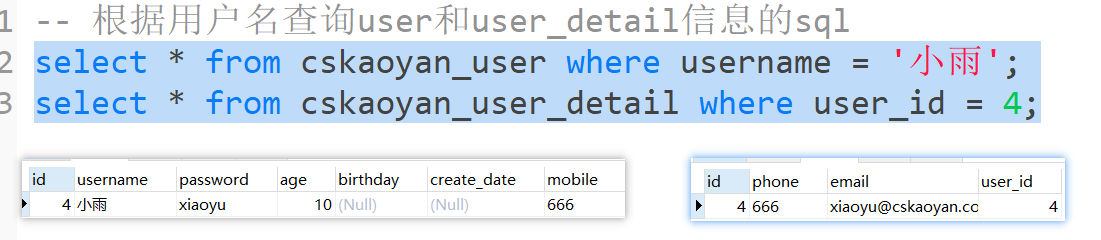
<mapper namespace="com.cskaoyan.demo2.mapper.UserMapper"><resultMap id="userMap" type="com.cskaoyan.vo.User"><result column="id" property="id"/><result column="username" property="username"/><result column="password" property="password"/><result column="age" property="age"/><result column="birthday" property="birthday"/><result column="mobile" property="mobile"/><!--column属性:始终对应的是查询结果的列名--><!--property属性:始终对应的是父标签类型的成员变量名--><result column="create_date" property="createDate"/><!--新的标签association → 一对一关系--><!--column属性:始终对应的是查询结果的列名,对应的是第一次查询的查询结果的列名,并且也作为第二次查询的参数--><!--property属性:始终对应的是父标签类型的成员变量名--><!--select属性:执行的第二个sql是谁 → 第二次查询的命名空间+id → 采用的参数是第一次查询结果的column属性列对应的结果--><association column="id" property="userDetail"select="com.cskaoyan.mapper.UserMapper.selectUserDetailByUserId"/></resultMap><select id="selectUserByUsername" resultMap="userMap">SELECT id, username, password, age, mobile, birthday, create_datefrom cskaoyan_userwhere username = #{username}</select><select id="selectUserDetailByUserId" resultType="com.cskaoyan.vo.UserDetail">select id, phone, emailfrom cskaoyan_user_detailwhere user_id = #{id}</select><select id="selectUsersInIdArray" resultMap="userMap">SELECT id,username,password,age,mobile,birthday,create_date from cskaoyan_userwhere id in<foreach collection="ids" item="id" separator="," open="(" close=")">#{id}</foreach></select></mapper><mapper namespace="com.cskaoyan.demo2.mapper.UserDetailMapper"><select id="selectByUserId" resultType="com.cskaoyan.demo2.bean.UserDetail">select id, phone, email, user_id as userIdfrom cskaoyan_user_detailwhere user_id = #{userId}</select></mapper>

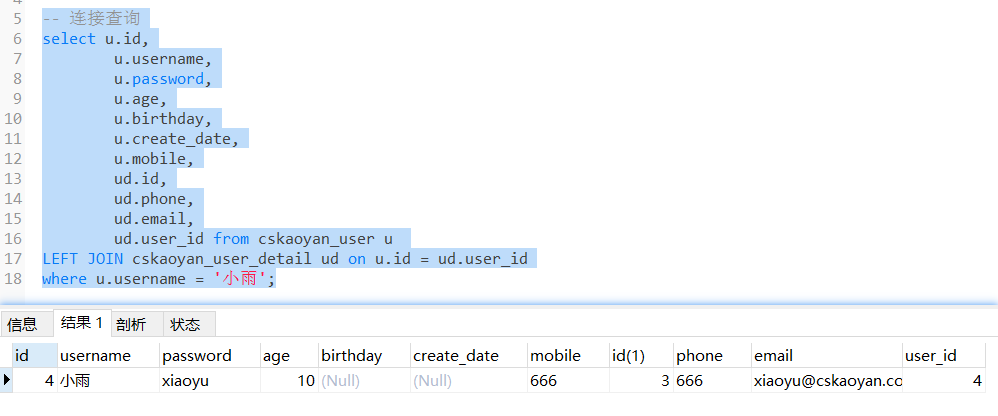
方式二: 连接查询

UserMapper接口
// 通过左连接查询的方式来查询、封装User selectUserByUsernameLeftJoin(@Param("username") String username);UserMapper.xml
<resultMap id="userMap2" type="com.cskaoyan.demo2.bean.User"><id column="id" property="id"/><result column="username" property="username"/><result column="password" property="password"/><result column="age" property="age"/><result column="birthday" property="birthday"/><result column="create_date" property="createDate"/><result column="mobile" property="mobile"/><!--进一步建立映射关系--><association property="userDetail" javaType="com.cskaoyan.demo2.bean.UserDetail"><id column="udid" property="id"/><result column="phone" property="phone"/><result column="email" property="email"/><result column="user_id" property="userId"/></association></resultMap><select id="selectUserByUsernameLeftJoin" resultMap="userMap2">selectu.id,u.username,u.password,u.age,u.birthday,u.create_date,u.mobile,ud.id as udid,ud.phone,ud.email,ud.user_idfrom cskaoyan_user uLEFT JOIN cskaoyan_user_detail ud on u.id = ud.user_idwhere u.username = #{username}</select>
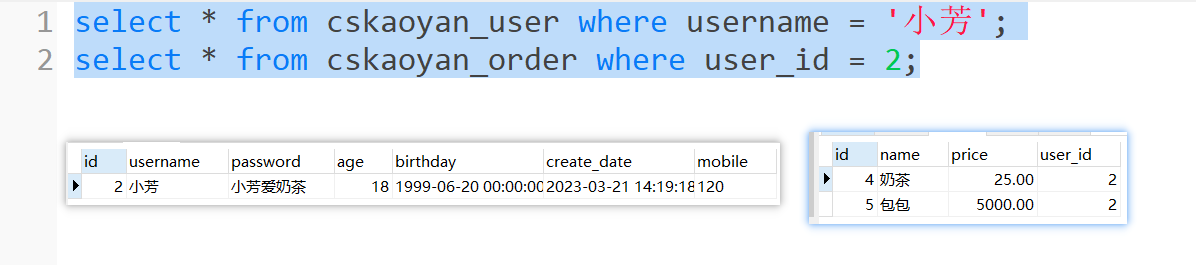
一对多结构
结构示例
CREATE TABLE `cskaoyan_order` (`id` int(11) NOT NULL AUTO_INCREMENT,`name` varchar(255) DEFAULT NULL,`price` decimal(10,2) DEFAULT NULL,`user_id` int(11) DEFAULT NULL,PRIMARY KEY (`id`)) ENGINE=InnoDB AUTO_INCREMENT=6 DEFAULT CHARSET=utf8mb4;@Data@AllArgsConstructor@NoArgsConstructorpublic class Order {private Integer id;private String name;private Double price;}@Data@AllArgsConstructor@NoArgsConstructorpublic class User {private Integer id;private String username;private String password;private Integer age;private Date birthday;private Date createDate;private String mobile;private UserDetail userDetail;private List<Order> orders;}
方式一: 分次查询

UserMapper接口
User selectByPrimaryKey(@Param("id") Integer id);User selectByUsername(@Param("username") String username);UserMapper.xml
<mapper namespace="com.cskaoyan.demo3.mapper.UserMapper"><sql id="Base_User_Select">select id, username, password, age, birthday, create_date, mobile from cskaoyan_user</sql><resultMap id="userMap" type="com.cskaoyan.demo3.bean.User"><id column="id" property="id"/><result column="username" property="username"/><result column="password" property="password"/><result column="age" property="age"/><result column="birthday" property="birthday"/><result column="create_date" property="createDate"/><result column="mobile" property="mobile"/><collection property="orders" column="id" select="com.cskaoyan.demo3.mapper.OrderMapper.selectByUserId"/></resultMap><select id="selectByPrimaryKey" resultMap="userMap"><include refid="Base_User_Select"/>where id = #{id}</select><select id="selectByUsername" resultMap="userMap"><include refid="Base_User_Select"/>where username = #{username}</select></mapper><mapper namespace="com.cskaoyan.demo3.mapper.OrderMapper"><resultMap id="orderMap" type="com.cskaoyan.demo3.bean.Order"><id column="id" property="id"/><result column="name" property="name"/><result column="price" property="price"/></resultMap><select id="selectByUserId" resultMap="orderMap">select id, name, price, user_id from cskaoyan_order where user_id = #{userId}</select></mapper>
方式二: 连接查询
UserMapper接口
User[] selectUsersByIdArrayLeftJoin(@Param("ids") Integer[] ids);UserMapper.xml
<resultMap id="userMapLeftJoin" type="com.cskaoyan.vo.User"><result column="id" property="id"/><result column="username" property="username"/><result column="password" property="password"/><result column="age" property="age"/><result column="birthday" property="birthday"/><result column="mobile" property="mobile"/><!--column属性:始终对应的是查询结果的列名--><!--property属性:始终对应的是父标签类型的成员变量名--><result column="create_date" property="createDate"/><!--和一对一类型的表达不同--><collection property="orders" ofType="com.cskaoyan.vo.Order"><result column="oid" property="id"/><result column="name" property="name"/><result column="price" property="price"/></collection></resultMap><select id="selectUsersByIdArrayLeftJoin" resultMap="userMapLeftJoin">selectu.id,u.username,u.password,u.age,u.mobile,u.birthday,u.create_date,o.id as oid, o.name, o.pricefrom cskaoyan_user uleft join cskaoyan_order o on u.id = o.user_idwhere u.id in<foreach collection="ids" item="id" separator="," open="(" close=")">#{id}</foreach></select>
多对多结构
结构示例
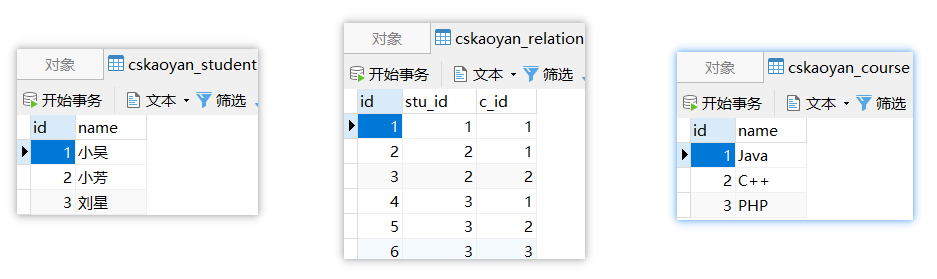
CREATE TABLE `cskaoyan_relation` (`id` int(11) NOT NULL AUTO_INCREMENT,`stu_id` int(11) DEFAULT NULL,`c_id` int(11) DEFAULT NULL,PRIMARY KEY (`id`)) ENGINE=InnoDB AUTO_INCREMENT=7 DEFAULT CHARSET=utf8mb4;CREATE TABLE `cskaoyan_student` (`id` int(11) NOT NULL AUTO_INCREMENT,`name` varchar(255) DEFAULT NULL,PRIMARY KEY (`id`)) ENGINE=InnoDB AUTO_INCREMENT=4 DEFAULT CHARSET=utf8mb4;CREATE TABLE `cskaoyan_course` (`id` int(11) NOT NULL AUTO_INCREMENT,`name` varchar(255) DEFAULT NULL,PRIMARY KEY (`id`)) ENGINE=InnoDB AUTO_INCREMENT=4 DEFAULT CHARSET=utf8mb4;@Datapublic class Student {Integer id;String name;List<Course> courses;}@Datapublic class Course {Integer id;String name;List<Student> students;}
方式一: 分次查询
Mapper接口
public interface StudentMapper {Student selectByName(@Param("name") String name);}Mapper.xml
<mapper namespace="com.cskaoyan.mapper.StudentMapper"><!--该映射文件里采用的是分次查询--><resultMap id="studentMap" type="com.cskaoyan.vo.Student"><result column="id" property="id"/><result column="name" property="name"/><collection property="courses" column="id" select="com.cskaoyan.mapper.StudentMapper.selectCoursesByStudentId"/></resultMap><select id="selectByName" resultMap="studentMap">select id, namefrom cskaoyan_studentwhere name = #{name}</select><resultMap id="courseMap" type="com.cskaoyan.vo.Course"><result column="id" property="id"/><result column="name" property="name"/></resultMap><select id="selectCoursesByStudentId" resultMap="courseMap">select c.id, c.namefrom cskaoyan_course cleft join cskaoyan_relation r on c.id = r.c_idwhere r.stu_id = #{id}</select></mapper>
方式二: 连接查询
Mapper接口
public interface CourseMapper {Course selectByName(@Param("name") String name);}Mapper.xml
<mapper namespace="com.cskaoyan.mapper.CourseMapper"><resultMap id="courseMap" type="com.cskaoyan.vo.Course"><result column="id" property="id"/><result column="name" property="name"/><collection property="students" ofType="com.cskaoyan.vo.Student"><result column="sid" property="id"/><result column="sname" property="name"/></collection></resultMap><select id="selectByName" resultMap="courseMap">select c.id, c.name, s.id as sid, s.name as snamefrom cskaoyan_course cLEFT JOIN cskaoyan_relation r ON c.id = r.c_idLEFT JOIN cskaoyan_student s ON s.id = r.stu_idwhere c.`name` = #{name}</select></mapper>
动态SQL
动态SQL是Mybatis给我们提供的又一个强大的功能。可以帮助我们根据传入的条件,动态的去改变SQL语句。
通过在映射文件中使用一些不同的标签,会让一个方法对应的SQL语句(主要是insert、delete、update、select标签内的sql语句)产生变化
是为了让你这个标签内的SQL更强大,更通用
业务场景
条件查询
-- 查询所有的手机的记录select * from phone_t-- 如果增加机身存储空间的条件select * from phone_t where storage = '512GB'-- 继续增加条件CPU为天玑7200select * from phone_t where storage = '512GB' and cpu = '天玑7200'-- 继续增加内存select * from phone_t where storage = '512GB' and cpu = '天玑7200' and memory = '12GB'Mapper接口中的方法 可以如何定义
- List<Phone> selectAll();
- List<Phone> selectByStorage(String storage);
- List<Phone> selectByStorageAndCPU(String storage,String cpu);
- List
selectByStorageAndCPUAndMemory(String storage,String cpu,String memory); 是否有可能我根据存储空间和内存这两个条件查询呢
是否有可能我根据CPU内存两个条件查询呢?
如果有4个条件选择其中的两个查询,变成C42 = 6种情况
如果使用条件查询 → 只用Mapper接口中的一个方法就能满足我们的需求
- List/
selectByCondition(String storage,String cpu,String memory,String size) 条件更新(插入)
- 更新对象中成员变量不为空的列
in语句
- — 这样的参数通过输入映射如何传进来 SELECT * FROM
cskaoyan_userwhere id in (1,2,3)批量插入
- 传入User的多条记录(User[]、List<User>、Set<User>等)
- 想要通过一条sql语句一起插入到数据库
- insert into cskaoyan_user (username,password,age,birthday,create_date,mobile) values (?,?,?,?,?,?),(?,?,?,?,?,?),(?,?,?,?,?,?),(?,?,?,?,?,?)
where
where这个标签可以帮助我们在最终执行的SQL中自动生成where关键字
//1, 可以自动拼接where关键字 (一般和if配合使用)//2, 去除相邻的and或者是or关键字//3, 如果where标签中没有条件满足的时候(如果SQL片段需要拼接),那么where标签不会给我们拼接where关键字// 注意一般if(工作用到更多一些),choose when otherwise(也会用, 用到相对if少一些),都要注意, 尽量写在where标签内部, 因为, 如果根据条件做处理的时候, 没有任何一个条件满足, 如果又使用的where标签(而不是写死的where关键字), 那么最终执行的sql上不会生成where(避免出错)// where标签// Preparing: select id, brand, name, storage, memory, cpu from cskaoyan_phone WHERE id = ?Phone selectByPrimaryKey(@Param("id") Integer id);<!--如果where标签后面直接跟了and或or,会在预编译过程被自动省略掉如果where标签里没有内容,不会拼接where--><select id="selectByPrimaryKey" resultType="com.cskaoyan.demo3.bean.Phone">select id, brand, name, storage, memory, cpu from cskaoyan_phone<where>and id = #{id}</where></select>
if
Java代码中的if 啥功能,如果if中的条件为true,则执行if中的代码
映射文件中使用if标签,test属性它的值为true,则会拼接if标签内的SQL语句;如果test属性值为false则不会拼接
if标签可以帮助我们去做判断是否满足某个条件
转义字符(推荐) OGNL表达式// > > gt// < < lt// >= >= gte// <= <= lte// !=// ==// and// or// 在<if test="">,引号中,我们可以不使用转义字符,可以使用OGNL表达式的写法test属性中合法的写法输入映射可以写的值,那么在test属性中可以直接使用如果有多个条件 使用 and或or来连接
代码示例
// if标签 → 完成条件查询List<Phone> selectByCondition(@Param("brand") String brand, @Param("name") String name, @Param("storage") String storage, @Param("memory") String memory, @Param("cpu") String cpu);<!--思考:如果brand为空?如果全部参数都为空--><select id="selectByCondition" resultType="com.cskaoyan.demo3.bean.Phone">select id, brand, name, storage, memory, cpufrom cskaoyan_phone<where><if test="brand != null and brand != ''">brand = #{brand}</if><if test="name != null and name != ''">and `name` = #{name}</if><if test="storage != null and storage != ''">and storage = #{storage}</if><if test="memory != null and memory != ''">and memory = #{memory}</if><if test="cpu != null and cpu != ''">and cpu = #{cpu}</if></where></select>
choose when otherwise
choose when otherwise就相当于Java中的 if … else…
<choose><when test="它的用法和if标签中的test一样">if拼接的sql语句</when><otherwise>else拼接的sql语句</otherwise></choose>和where一起使用
// choose-when-otherwise标签// 如果传入的memory为8,则执行的条件为 where memory >= #{memory}// 如果传入的memory不为8,则执行的条件为 where memory = #{memory}List<Phone> selectByMemory(@Param("memory") String memory);<select id="selectByMemory" resultType="com.cskaoyan.demo3.bean.Phone">select id, brand, name, storage, memory, cpufrom cskaoyan_phone<where><choose><when test="memory == 8">memory >= #{memory}</when><otherwise>memory = #{memory}</otherwise></choose></where></select>
@Testpublic void testChooseWhenOtherwise() { PhoneMapper phoneMapper = MyBatisUtil.getSqlSession().getMapper(PhoneMapper.class); //==> Preparing: select id, brand, name, storage, memory, cpu from cskaoyan_phone WHERE memory >= ? //==> Parameters: 8(String) List<Phone> phoneList1 = phoneMapper.selectByMemory("8"); //==> Preparing: select id, brand, name, storage, memory, cpu from cskaoyan_phone WHERE memory = ? //==> Parameters: 12(String) List<Phone> phoneList2 = phoneMapper.selectByMemory("12");}sql-include
映射文件中出现的相同的SQL可以做一个提取
- 把相同的部分放在SQL标签中,并且对外提供一个id,这段SQL也可以称之为SQL片段
- 使用include标签进行引用,refid属性值为sql标签的id属性值
// sql标签可以帮助我们把公共的sql提取出来// include可以帮助我们引入公共的sql片段。提取
<sql id="base_sql">select * from `order`</sql>引入
<select id="selectOrderById" resultType="com.snow.www.bean.Order"><include refid="base_sql" /> <!-- 引入 --><where>id=#{id}</where></select><select id="selectOrderListByOrder" resultType="com.snow.www.bean.Order"><include refid="base_sql" /> <!-- 引入 --><where><if test="id > 2">or id=#{id}</if><if test="orderName != null">or orderName=#{orderName}</if><if test="price > 30 and price lt 160 ">or price=#{price}</if></where></select>// 优点:可以提取公共的sql片段,减少编码量// 缺点:用了sql-include 之后,SQL语句的可读性变差了
sql-include 标签我们一般用来提取 列名。
提取
<sql id="base_sql">id, orderName, price as priceS</sql>引入
<select id="selectOrderById" resultType="com.snow.www.bean.Order">select<include refid="base_sql" />from `order`<where>id=#{id}</where></select>好处分析
// 避免写select *// 避免浪费网络资源// 不破坏SQL语句的可读性
trim
trim标签里面写的是SQL语句(包含标签),在其内容的最前面和最后面可以增加指定字符,在其内容最前面和最后面也可以去除指定字符
- prefix 前缀
- suffix 后缀
- prefixOverrides
- suffixOverrides
trim标签可以帮助我们动态的去增加指定的字符,或者是删除指定的字符。
// 没有增加@Param注解 #{}可以用啥 → 成员变量名int updateByPrimaryKey(User user);int updateSelectiveByPrimaryKey(User user);<!--prefix: 增加指定的前缀suffix: 增加指定的后缀prefixOverrides: 删除指定的前缀suffixOverrides: 删除指定的后缀-->``````xml<mapper namespace="com.cskaoyan.demo1.mapper.UserMapper"><update id="updateByPrimaryKey">update cskaoyan_userset username = #{username},password = #{password},age=#{age},birthday = #{birthday},create_date = #{createDate},mobile = #{mobile}where id = #{id}</update><update id="updateSelectiveByPrimaryKey">update cskaoyan_userset<trim suffixOverrides=","><if test="username != null">username = #{username},</if><if test="password != null">password = #{password},</if><if test="age != null">age=#{age},</if><if test="birthday != null">birthday = #{birthday},</if><if test="createDate != null">create_date = #{createDate},</if><if test="mobile != null">mobile = #{mobile}</if></trim>where id = #{id}</update></mapper>// 也可以将set写到trim标签中update cskaoyan_user<trim prefix="set" suffixOverrides=",">```
set
<set> 就相当于 <trim prefix=“SET” suffixOverrides=”,”> 这个配置,和这个是等价的。
// 去除set标签中的最后一个 ","// 拼接set关键字Order order = new Order();order.setId(1);order.setOrderName("yy");order.setPrice(10000);orderSQLMapper.updateOrderByOrderSetLabel(order);void updateOrderByOrderSetLabel(@Param("order") Order order);<update id="updateOrderByOrderSetLabel">update `order`<set><if test="order.orderName != null">orderName = #{order.orderName},</if><if test="order.price != null">price = #{order.price},</if></set>where id = #{order.id}</update>
foreach
做的是遍历,在遍历的过程中,拼接foreach标签中的内容
做的是数组和集合类的遍历
Foreach可以帮助我们去循环处理SQL语句。
foreach标签以及里面的属性
<foreach collection="需要遍历的内容,比如数组或集合类list等" item="遍历过程中的单项值" open="在foreach标签最左侧拼接字符" close="foreach标签最右侧拼接值" separator="每两个遍历的内容之间的补充字符" index="下标,没啥用"> 会被遍历拼接的内容</foreach>- collection属性:
- 如果Mapper接口中的方法的形参使用了@Param,用的就是@Param注解的属性值
- 如果没有使用注解:如果是数组,则写array;如果是list就写list
- item属性:自己定义,在foreach标签内可以使用#{}方式使用该值
- open、close属性:最前和最后去拼接字符,拼接一次
- separator属性:每两个遍历的内容之间的补充字符;拼接次数为n-1
批量插入
-- 哪些内容出现了n次 → foreach标签中 → (?,?,?,?,?,?)-- 哪些内容出现了n-1次 → separator属性中 → ,-- 哪些内容出现了1次 → open、close属性中 → 无insert into cskaoyan_user (username,password,age,birthday,create_date,mobile) values (?,?,?,?,?,?),(?,?,?,?,?,?),(?,?,?,?,?,?),(?,?,?,?,?,?)Foreach在插入的使用
// 当个方法中传入的参数没有注解的时候,假如传入的List,那么就可以使用 list,假如传入的是数组,那么就可以使用 array// 当方法中传入的参数有注解的时候,collection里面必须写注解的值List类型参数
没有注解, foreach的循环从插入的时候, 要求foreach标签的 collection参数, 是collection (如果List对象建议写list)
/*** 使用foreach做批量插入*/@Testpublic void testBatchInsert() {User user1 = new User(null,"张三","123456",25,new Date(),new Date(),"110");User user2 = new User(null,"李四","123456",26,new Date(),new Date(),"110");User user3 = new User(null,"王五","123456",27,new Date(),new Date(),"110");List<User> users = Arrays.asList(user1, user2, user3);UserMapper userMapper = MyBatisUtil.getMapper(UserMapper.class);int insert = userMapper.insertUsers(users);//==> Preparing: insert into cskaoyan_user (username,password,age,birthday,create_date,mobile)// values (?,?,?,?,?,?) , (?,?,?,?,?,?) , (?,?,?,?,?,?)}int insertUsers(@Param("users") List<User> users);<!--collection:传入参数的名字,参数没有添加注解的时候,使用 collection | listseparator:循环的时候,以什么字符分割开open:在循环开始的时候,添加指定的字符close:在循环结束的时候,添加指定的字符item:循环中的元素名 相当于 for(int i=0;i<100;i++) {} 中的 iindex: 元素的下标 --><insert id="insertUsers">insert into cskaoyan_user (username,password,age,birthday,create_date,mobile)values<!--(?,?,?,?,?,?),(?,?,?,?,?,?),(?,?,?,?,?,?),(?,?,?,?,?,?)--><foreach collection="users" item="user" separator=",">(#{user.username},#{user.password},#{user.age},#{user.birthday},#{user.createDate},#{user.mobile})</foreach></insert>数组类型参数
没有注解, foreach的循环从插入的时候, 要求foreach标签的 collection参数, 必须是array
Order[] orders = new Order[2];orders[0] = new Order(null, "aa", 100);orders[1] = new Order(null, "bb", 100);int rows = orderSQLMapper.insertArrayOrder(orders);System.out.println(rows);int insertArrayOrder(Order[] orders);<insert id="insertArrayOrder">insert into `order` values<foreach collection="array" separator="," open="" close="" index="" item="order">( #{order.id}, #{order.orderName}, #{order.price} )</foreach></insert>添加注解
如果在使用foreach的循环从插入的时候, 要求foreach标签的 collection参数, 必须是
注解名// Order[] orders = new Order[2];// orders[0] = new Order(null, "aa", 100);// orders[1] = new Order(null, "bb", 100);// int rows = orderSQLMapper.insertArrayParamOrder(orders);ArrayList<Order> orders = new ArrayList<>();orders.add(new Order(null, "aa", 100));orders.add(new Order(null, "bb", 100));int rows = orderSQLMapper.insertArrayParamOrder(orders);// int insertArrayParamOrder(@Param("orderList")Order[] orders);int insertArrayParamOrder(@Param("orderList") List<Order> orders);<insert id="insertArrayParamOrder">insert into `order` values<foreach collection="orderList" separator="," open="" close="" index="" item="order">( #{order.id}, #{order.orderName}, #{order.price} )</foreach></insert>
使用in查询
Foreach在查询时候的使用:
注意: foreach collection在不使用注解情况下, 默认集合类使用collection (List建议使用List), 数组使用array
如果参数使用了注解, foreach 标签的collection属性使用注解名
@Testpublic void testForeachIn() {UserMapper userMapper = MyBatisUtil.getMapper(UserMapper.class);List<Integer> ids = Arrays.asList(1, 2, 3);List<User> users = userMapper.selectByIds3(ids);System.out.println("users = " + users);//==> Preparing: select id, username, password, age, birthday, create_date, mobile from cskaoyan_user WHERE id in ( ? , ? , ? )//==> Parameters: 1(Integer), 2(Integer), 3(Integer)}// 以下几种写法,collection属性值应该如何写// 无注解数组 → collection="array"List<User> selectByIds1(Integer[] ids);// 有注解数组 → collection="ids"List<User> selectByIds2(@Param("ids") Integer[] ids);// 无注解List → collection="list"List<User> selectByIds3(List<Integer> ids);// 有注解List → collection="ids"List<User> selectByIds4(@Param("ids") List<Integer> ids);<sql id="BASE_USER_Select">select id, username, password, age, birthday, create_date, mobile from cskaoyan_user</sql><select id="selectByIds1" resultType="com.cskaoyan.demo1.bean.User"><include refid="BASE_USER_Select"/><where><!--?出现n次 → foreach标签中的内容,出现n-1次 → separator中的内容()都出现一次 → open,close-->id in<foreach collection="array" item="id" separator="," open="(" close=")">#{id}</foreach></where></select><select id="selectByIds2" resultType="com.cskaoyan.demo1.bean.User"><include refid="BASE_USER_Select"/><where><!--?出现n次 → foreach标签中的内容,出现n-1次 → separator中的内容()都出现一次 → open,close-->id in<foreach collection="ids" item="id" separator="," open="(" close=")">#{id}</foreach></where></select><select id="selectByIds3" resultType="com.cskaoyan.demo1.bean.User"><include refid="BASE_USER_Select"/><where><!--?出现n次 → foreach标签中的内容,出现n-1次 → separator中的内容()都出现一次 → open,close-->id in<foreach collection="list" item="id" separator="," open="(" close=")">#{id}</foreach></where></select><select id="selectByIds4" resultType="com.cskaoyan.demo1.bean.User"><include refid="BASE_USER_Select"/><where><!--?出现n次 → foreach标签中的内容,出现n-1次 → separator中的内容()都出现一次 → open,close-->id in<foreach collection="ids" item="id" separator="," open="(" close=")">#{id}</foreach></where></select>
selectkey
额外执行一个查询,并且将查询的结果给到输入映射传入的参数
这个标签可以帮助我们在执行目标SQL语句之前或者是之后执行一条额外的SQL语句。
AFTER操作
@Testpublic void testInsert() {UserMapper userMapper = MyBatisUtil.getMapper(UserMapper.class);User user = new User(null,"赵六","123456",25,new Date(),new Date(),"110");int insert = userMapper.insertUser(user);System.out.println("id = " + user.getId());//==> Preparing: insert into cskaoyan_user (username,password,age,birthday,create_date,mobile) values (?,?,?,?,?,?)//==> Parameters: 赵六(String), 123456(String), 25(Integer), 2023-03-28 14:34:30.268(Timestamp), 2023-03-28 14:34:30.268(Timestamp), 110(String)//<== Updates: 1//==> Preparing: select LAST_INSERT_ID() as lastid//==> Parameters://<== Columns: lastid//<== Row: 73//<== Total: 1//id = 73}int insertUser(@Param("user") User user);<!--keyColumn:查询结果集中的列名keyProperty:封装给谁 → 和输入映射可写的值有关系 → user user.xxxresultType:查询结果的类型标签中:额外执行的sql语句order:顺序,相较于当前的sql语句,额外的查询的相对顺序--><insert id="insertUser"><selectKey keyColumn="lastid" keyProperty="user.id" resultType="integer" order="AFTER">select LAST_INSERT_ID() as lastid</selectKey>insert into cskaoyan_user (username,password,age,birthday,create_date,mobile)values(#{user.username},#{user.password},#{user.age},#{user.birthday},#{user.createDate},#{user.mobile})<!--执行完insert之后,执行select LAST_INSERT_ID(); 这个查询是有结果的,这个结果要给到userid--></insert>BEFORE:操作
Order order = new Order();order.setOrderName("nn");order.setPrice(100);int rows = orderSQLMapper.insertOrder(order);System.out.println(order);int insertOrder(@Param("order")Order order);<insert id="insertOrder"><selectKey order="BEFORE" keyProperty="order.price" resultType="float">select price from `order` where id = 2</selectKey>insert into `order`<set><if test="order.id != null">id = #{order.id},</if><if test="order.orderName != null">orderName = #{order.orderName},</if><if test="order.price != null">price = #{order.price},</if></set></insert>
useGeneratedKeys
需要使用到两个属性:useGeneratedKeys、keyProperty
useGeneratedKeys: 获取insert/update操作数据的主键
开启配置:useGeneratedKeys="true"映射到对应的参数中:keyProperty="order.id"@Testpublic void testInsert2() {UserMapper userMapper = MyBatisUtil.getMapper(UserMapper.class);User user = new User(null,"孙七","123456",25,new Date(),new Date(),"110");int insert = userMapper.insertUser2(user);System.out.println("id = " + user.getId());}int insertUser2(@Param("user") User user);<insert id="insertUser2" useGeneratedKeys="true" keyProperty="user.id">insert into cskaoyan_user (username,password,age,birthday,create_date,mobile)values(#{user.username},#{user.password},#{user.age},#{user.birthday},#{user.createDate},#{user.mobile})</insert>```
懒加载
懒加载和MyBatis缓存作为了解, 知道是怎么回事, 面试的时候可以谈一谈思想即可, 因为工作中并不会使用(基本不会使用)
懒加载又叫做延迟加载。
// 是指在Mybatis进行分次查询的时候,假如第二次查询的内容没有被使用到的话,那么就不去执行第二次查询的SQL语句,等到用到第二次查询的内容的时候再去执行第二条SQL语句。注意:
// 1. 当局部开关配置的时候,以局部开关的配置为准// 2. 当局部开关没有配置的时候,以总开关的配置为准// 3. 当总开关也没有配置的时候,以默认配置为准(默认配置是关闭懒加载)
总开关配置: mybatis的主配置文件里面的settings里面
<settings><!-- 懒加载 true: 表示开启 false:默认值,表示关闭 --><setting name="lazyLoadingEnabled" value="true"/></settings>案例
public interface UserMapper {User[] selectUsersByIdArray(@Param("ids") Integer[] ids);}
局部开关
<mapper namespace="com.cskaoyan.mapper.UserMapper"><resultMap id="userMap" type="com.cskaoyan.vo.User"><result column="id" property="id"/><result column="username" property="username"/><result column="password" property="password"/><result column="age" property="age"/><result column="birthday" property="birthday"/><result column="mobile" property="mobile"/><!--column属性:始终对应的是查询结果的列名--><!--property属性:始终对应的是父标签类型的成员变量名--><result column="create_date" property="createDate"/><!--一对多使用的标签是collection标签--><collection column="id" property="orders" fetchType="eager"select="com.cskaoyan.mapper.UserMapper.selectOrdersByUserId"/></resultMap><!--第一次查询--><select id="selectUsersByIdArray" resultMap="userMap">SELECT id,username,password,age,mobile,birthday,create_date from cskaoyan_userwhere id in<foreach collection="ids" item="id" separator="," open="(" close=")">#{id}</foreach></select><!--select标签在Mapper接口中是否有对应的方法?没有,如果作为分次查询的第二次查询#{}里可以任意写--><select id="selectOrdersByUserId" resultType="com.cskaoyan.vo.Order">select id, name, pricefrom cskaoyan_orderwhere user_id = #{zzz}</select></mapper>注意:idea的Debug模式下不能复现懒加载,因为debug模式会显示出对象中的所有的信息,相当于已经用到了第二次SQL语句查询的内容,所以第二次SQL语句就会立马执行
思考: 懒加载用处
缓存
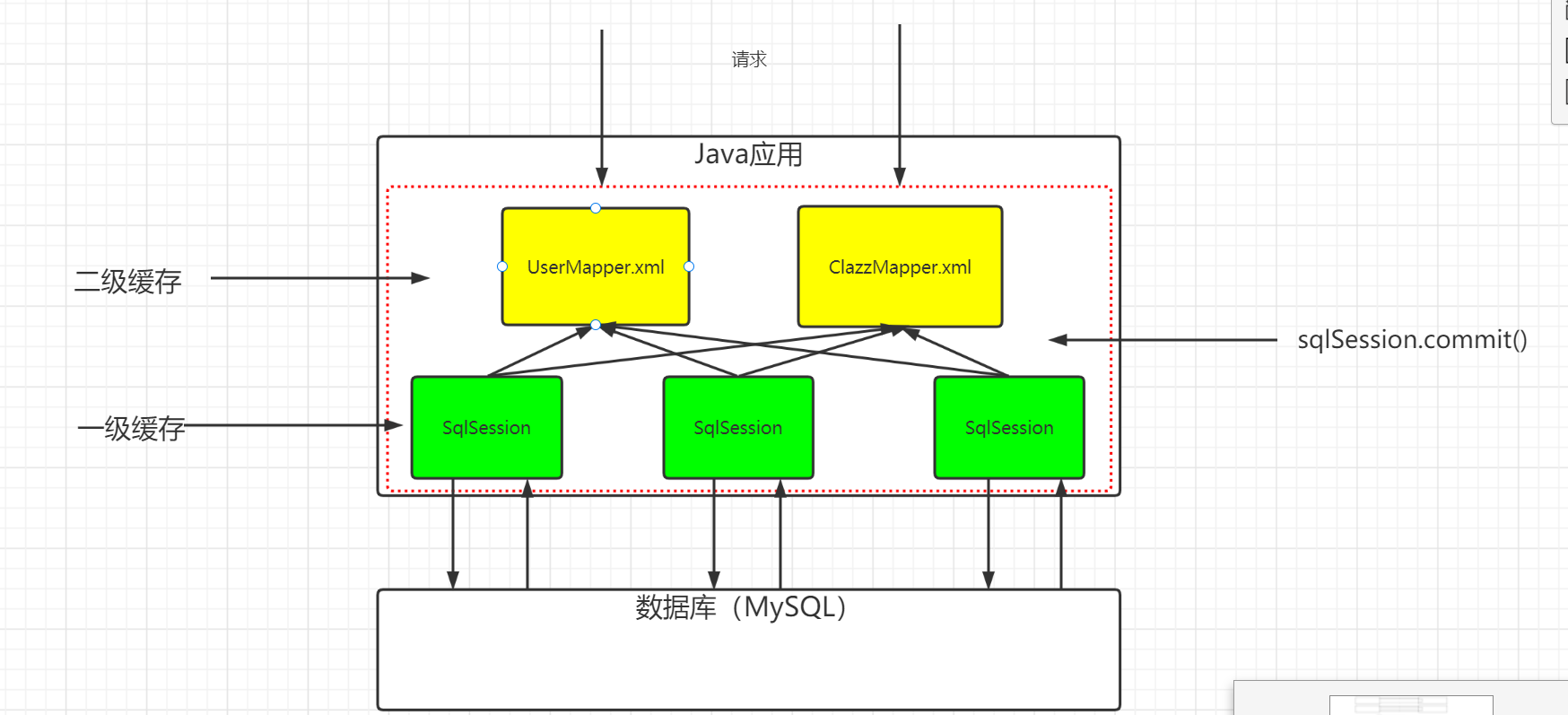
缓存是指在Mybatis中,单独开辟一块内存空间(map),来存储查询的信息。后续假如再次调用了到了同样的查询,那么就直接查询缓存。
MyBatis默认开启了缓存MyBatis是怎么存储缓存的: 在MyBatis中缓存是以Map(集合类容器)接口存储的// map:// key:SQL语句和查询的条件(注意: SQL语句是依赖于坐标的)// (MapperID+Sql+所有的入参)// value:查询的结果
一级缓存
一级缓存是一个以SqlSession管理的Mapper级别的缓存。缓存的内容存储在SQLSession中管理。
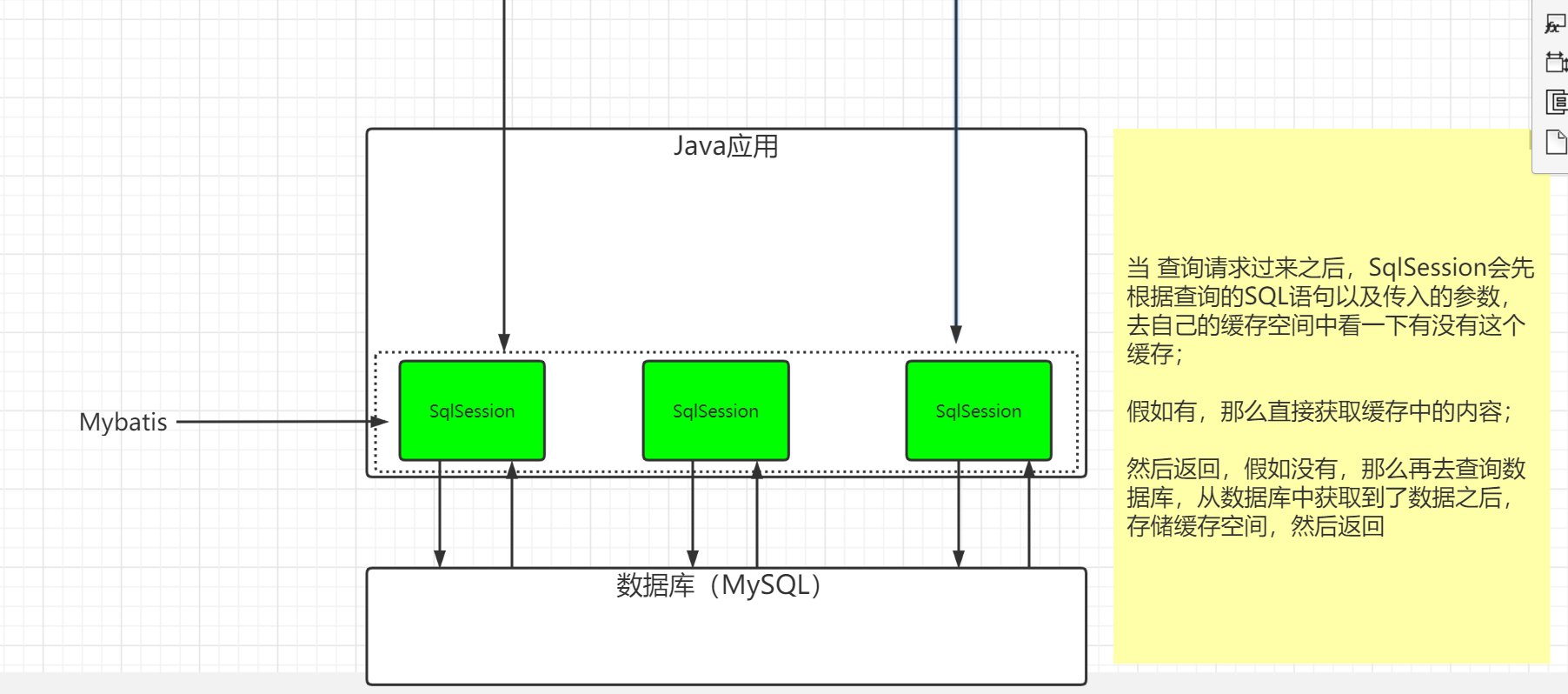
配置:一级缓存默认是开启的,并且没有提供开关给用户关闭(不可以关闭)。
一级缓存什么时候失效呢?// SqlSession关闭的时候// SqlSession调用增删改的时候,会清空当前SqlSession缓存// SqlSession调用commit方法
测试
同一个SqlSession 获取的同一个Mapper: 走缓存
同一个SQLSession获取不同的mapper: 走缓存
不同SQLSession获取不同的mapper: 不走缓存
@Testpublic void mytest1() {//使用同一个sqlSession的同一个Mapper可以使用到一级缓存User user1 = userMapper.selectByPrimaryKey(1);//生成缓存User user2 = userMapper.selectByPrimaryKey(1);//使用缓存User user3 = userMapper.selectByPrimaryKey(1);//使用缓存User user4 = userMapper.selectByPrimaryKey(1);//使用缓存User user5 = userMapper.selectByPrimaryKey(1);//使用缓存}@Testpublic void mytest2() {//使用同一个sqlSession的不同Mapper可以使用到一级缓存UserMapper userMapper1 = sqlSession.getMapper(UserMapper.class);UserMapper userMapper2 = sqlSession.getMapper(UserMapper.class);User user1 = userMapper1.selectByPrimaryKey(1);//生成缓存User user2 = userMapper1.selectByPrimaryKey(1);//使用缓存User user3 = userMapper2.selectByPrimaryKey(1);//使用缓存User user4 = userMapper2.selectByPrimaryKey(1);//使用缓存}@Testpublic void mytest3() {//如果sqlSession发生变化,使用不到一级缓存SqlSession sqlSession1 = sqlSessionFactory.openSession();SqlSession sqlSession2 = sqlSessionFactory.openSession();UserMapper userMapper1 = sqlSession1.getMapper(UserMapper.class);UserMapper userMapper2 = sqlSession2.getMapper(UserMapper.class);User user1 = userMapper1.selectByPrimaryKey(1);//生成缓存User user2 = userMapper1.selectByPrimaryKey(1);//使用缓存User user3 = userMapper2.selectByPrimaryKey(1);//生成缓存User user4 = userMapper2.selectByPrimaryKey(1);//使用缓存}@Testpublic void mytest4() {//使用同一个sqlSession的同一个Mapper可以使用到一级缓存User user1 = userMapper.selectByPrimaryKey(1);//生成缓存User user2 = userMapper.selectByPrimaryKey(1);//使用缓存User user3 = userMapper.selectByPrimaryKey(1);//使用缓存sqlSession.commit(); //缓存失效User user4 = userMapper.selectByPrimaryKey(1);//生成缓存User user5 = userMapper.selectByPrimaryKey(1);//使用缓存}
二级缓存
二级缓存是一个NameSpace级别(mapper.xml)的缓存,每一个NameSpace都有自己的单独的缓存空间。(要通过两级配置开启)
配置1:总开关
<!-- 二级缓存开关配置 --><setting name="cacheEnabled" value="true"/>配置2: 局部开关
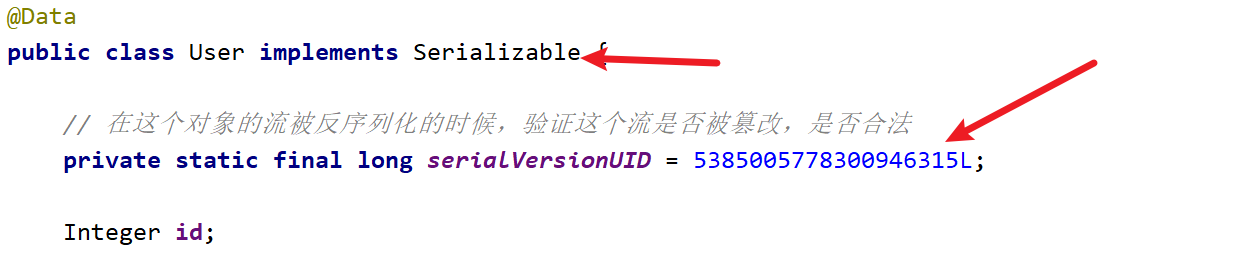
需要对二级缓存的缓存的所有相关对象实现序列化接口
开启自动生成序列化id
实现序列化接口,生成序列化id
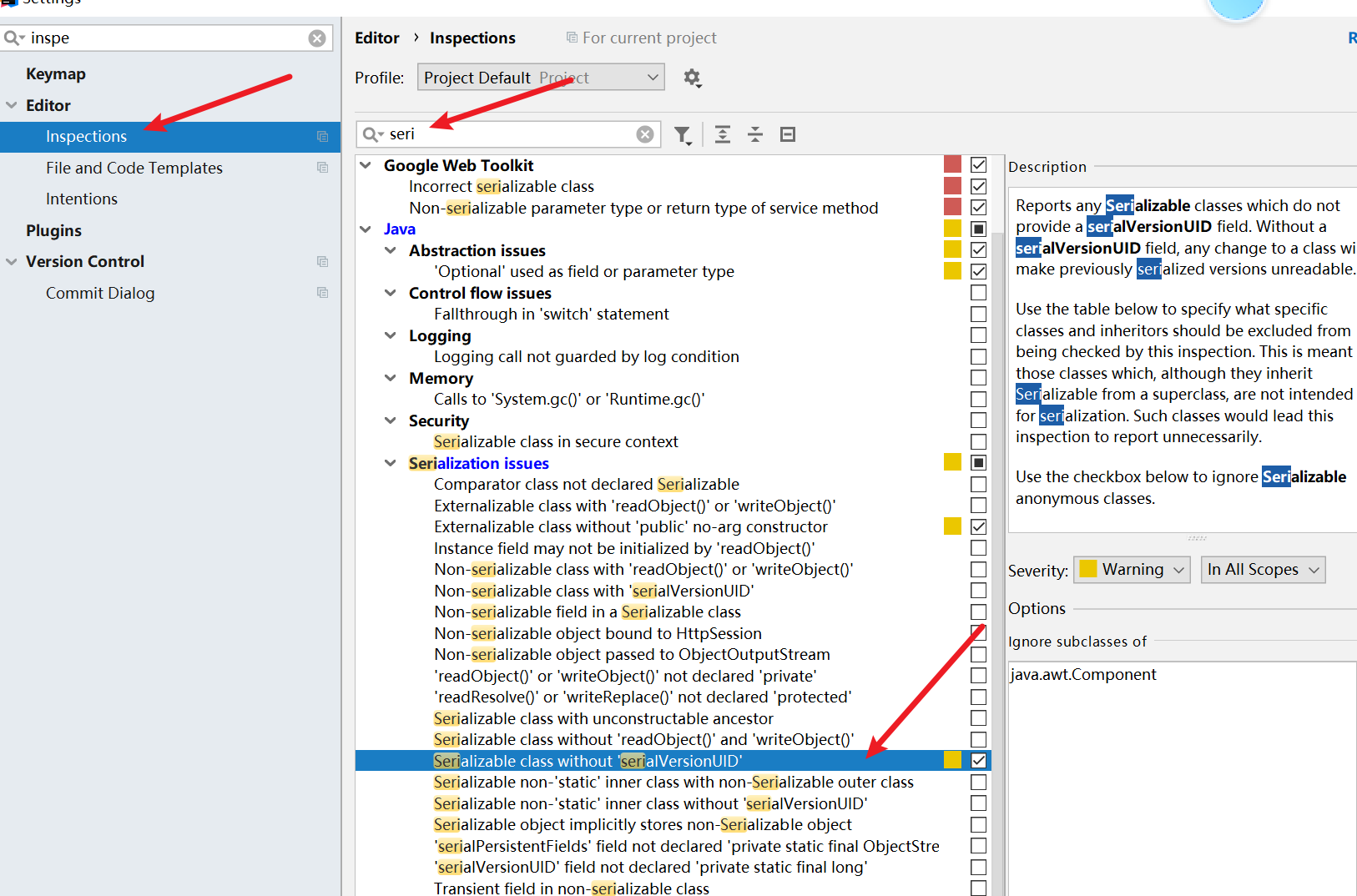
// 1, 二级缓存是 namespace级别/Mapper级别 的缓存// 2, 多个SqlSession可以共用二级缓存(同一个Mapper)// 3, 在关闭sqlsession后(close); 才会把该sqlsession一级缓存中的数据添加到对应namespace的二级缓存中。// 4, 当Mybatis默认先查询二级缓存,二级缓存中无对应数据,再去查询一级缓存,一级缓存中也没有,最后去数据库查找。
测试
测试
@Testpublic void mytest3() {SqlSession sqlSession1 = sqlSessionFactory.openSession();SqlSession sqlSession2 = sqlSessionFactory.openSession();SqlSession sqlSession3 = sqlSessionFactory.openSession();SqlSession sqlSession4 = sqlSessionFactory.openSession();UserMapper userMapper1 = sqlSession1.getMapper(UserMapper.class);UserMapper userMapper2 = sqlSession2.getMapper(UserMapper.class);UserMapper userMapper3 = sqlSession3.getMapper(UserMapper.class);UserMapper userMapper4 = sqlSession4.getMapper(UserMapper.class);User user1 = userMapper1.selectByPrimaryKey(1);User user2 = userMapper2.selectByPrimaryKey(1);User user3 = userMapper3.selectByPrimaryKey(1);User user4 = userMapper4.selectByPrimaryKey(1);//这个案例没有使用到二级缓存}@Testpublic void mytest4() {SqlSession sqlSession1 = sqlSessionFactory.openSession();SqlSession sqlSession2 = sqlSessionFactory.openSession();SqlSession sqlSession3 = sqlSessionFactory.openSession();SqlSession sqlSession4 = sqlSessionFactory.openSession();UserMapper userMapper1 = sqlSession1.getMapper(UserMapper.class);UserMapper userMapper2 = sqlSession2.getMapper(UserMapper.class);UserMapper userMapper3 = sqlSession3.getMapper(UserMapper.class);UserMapper userMapper4 = sqlSession4.getMapper(UserMapper.class);User user1 = userMapper1.selectByPrimaryKey(1);sqlSession1.close(); //将数据放入二级缓存User user2 = userMapper2.selectByPrimaryKey(1);User user3 = userMapper3.selectByPrimaryKey(1);User user4 = userMapper4.selectByPrimaryKey(1);User user5 = userMapper4.selectByPrimaryKey(1);//这个案例有使用到二级缓存 cache hit ratio}
二级缓存有没有用呢?
其实有一定的作用,但是也有一定的缺陷
- 确实能够提高Mybatis的性能
- 不能完美的解决脏数据的问题
- 二级缓存空间对于用户来说是完全透明的,我们用户不能够直接的去操作它,也不能够让用户指定去查询数据库还是查询缓存,所以其实使用起来不太方便
在以后的工作中,有一些需要使用缓存的场景,那么这个时候我们不会考虑使用Mybatis给我们提供的缓存,取而代之的是使用我们的NoSQL数据库(Redis)。
文章分享
如果这篇文章对你有帮助,欢迎分享给更多人!